Overview
- Release Notes and Announcements
- Product Introduction
- Purchase Guide
- Getting Started
- Console Guide
- Overview
- Creating Tasks
- Tasks
- Orchestrations
- Templates
- Resource Packs
- Video Evaluation
- AIGC Content Generation
- Terminal SDK
- Subtitle Editing Tool
- Usage Statistics
- Cloud Access Management Sample
- Integration Tutorials
- Audio/Video Transcoding Integration
- Audio/Video Enhancement Integration
- Audio Separation Integration
- Integration of Digital and Visible Watermarks
- Media AI Integration Tutorial
- Smart Subtitle Access Tutorial
- Smart Erase Tutorial (New)
- Smart Erase Tutorial (Old)
- AI Dubbing (excluding erasure) Integration
- One-stop Video Translation Access
- Intelligent Highlights Tutorial
- Video Splitting (Long Videos to Short Videos) Tutorial
- LLM Summarize Tutorial
- Video Remake Access
- Horizontal-to-Vertical Video Transformation Tutorial
- Music Identification Integration
- Media Quality Inspection Integration
- Terminal SDK integration
- MPS Live Stream Recording integration
- DRM integration
- Other tutorials
- Application Scenario and Practical Tutorial
- API Documentation
- History
- Introduction
- API Category
- Making API Requests
- Processing Task Initiation APIs
- Task management APIs
- Parse Event Notification APIs
- Transcoding and Enhancement Template APIs
- Watermark Template APIs
- Screenshot Template APIs
- CreateAnimatedGraphicsTemplate
- CreateSnapshotByTimeOffsetTemplate
- CreateSampleSnapshotTemplate
- CreateImageSpriteTemplate
- DeleteAnimatedGraphicsTemplate
- DeleteSnapshotByTimeOffsetTemplate
- DeleteSampleSnapshotTemplate
- DeleteImageSpriteTemplate
- DescribeAnimatedGraphicsTemplates
- DescribeSnapshotByTimeOffsetTemplates
- DescribeSampleSnapshotTemplates
- DescribeImageSpriteTemplates
- ModifyAnimatedGraphicsTemplate
- ModifySnapshotByTimeOffsetTemplate
- ModifySampleSnapshotTemplate
- ModifyImageSpriteTemplate
- Media AI Template APIs
- CreateSmartEraseTemplate
- CreateSmartSubtitleTemplate
- CreateSubtitleEmbedTemplate
- CreateContentReviewTemplate
- CreateAIAnalysisTemplate
- CreateAIRecognitionTemplate
- DeleteSmartEraseTemplate
- DeleteSmartSubtitleTemplate
- DeleteSubtitleEmbedTemplate
- DeleteContentReviewTemplate
- DeleteAIAnalysisTemplate
- DeleteAIRecognitionTemplate
- DescribeSmartEraseTemplates
- DescribeSmartSubtitleTemplates
- DescribeSubtitleEmbedTemplates
- DescribeContentReviewTemplates
- DescribeAIAnalysisTemplates
- DescribeAIRecognitionTemplates
- ModifySmartEraseTemplate
- ModifySmartSubtitleTemplate
- ModifySubtitleEmbedTemplate
- ModifyContentReviewTemplate
- ModifyAIAnalysisTemplate
- ModifyAIRecognitionTemplate
- Media AI—Hotword Lexicon APIs
- Media AI—Sample Management APIs
- Media Quality Inspection Template APIs
- Live Streaming Recording Template APIs
- Orchestration Management APIs
- Data Statistics APIs
- StreamLink—Security Group Management APIs
- AI Generation APIs
- Image Processing Template APIs
- Media AI – Episode Management APIs
- Media AI – Dubbing APIs
- AIGC scenario application APIs
- Other APIs
- Data Types
- Error Codes
- Other Documents
- FAQs
- Related Agreement
- Contact Us
- Glossary
Menu
Live Stream Task Management
Last updated: 2024-06-11 15:54:10Download PDF
Operation Descriptions
Live Task Creation
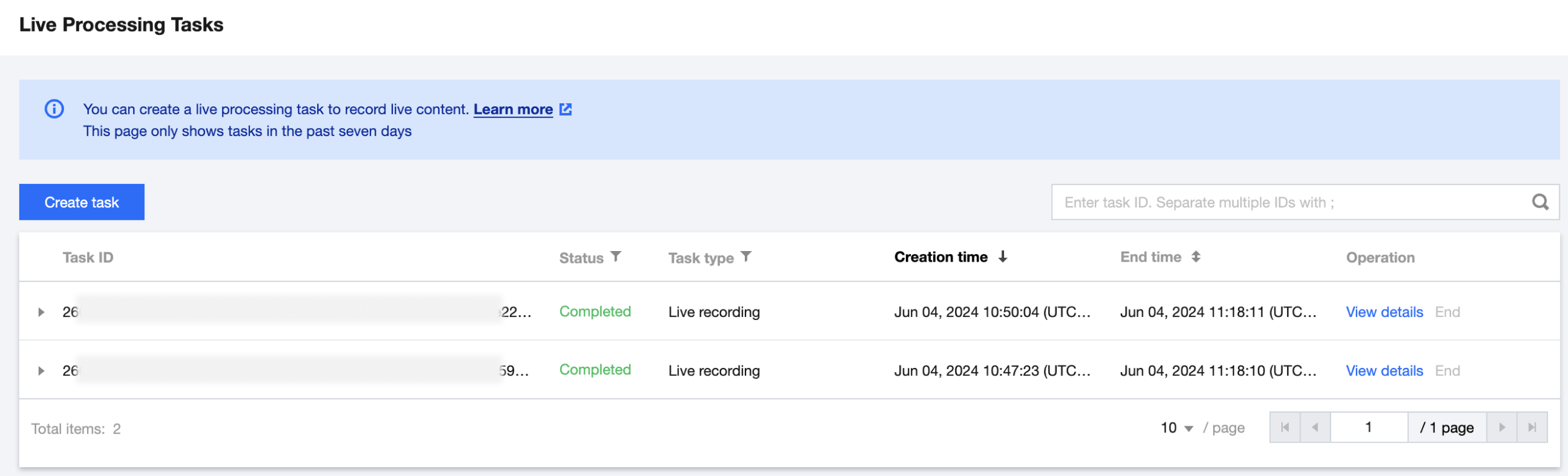
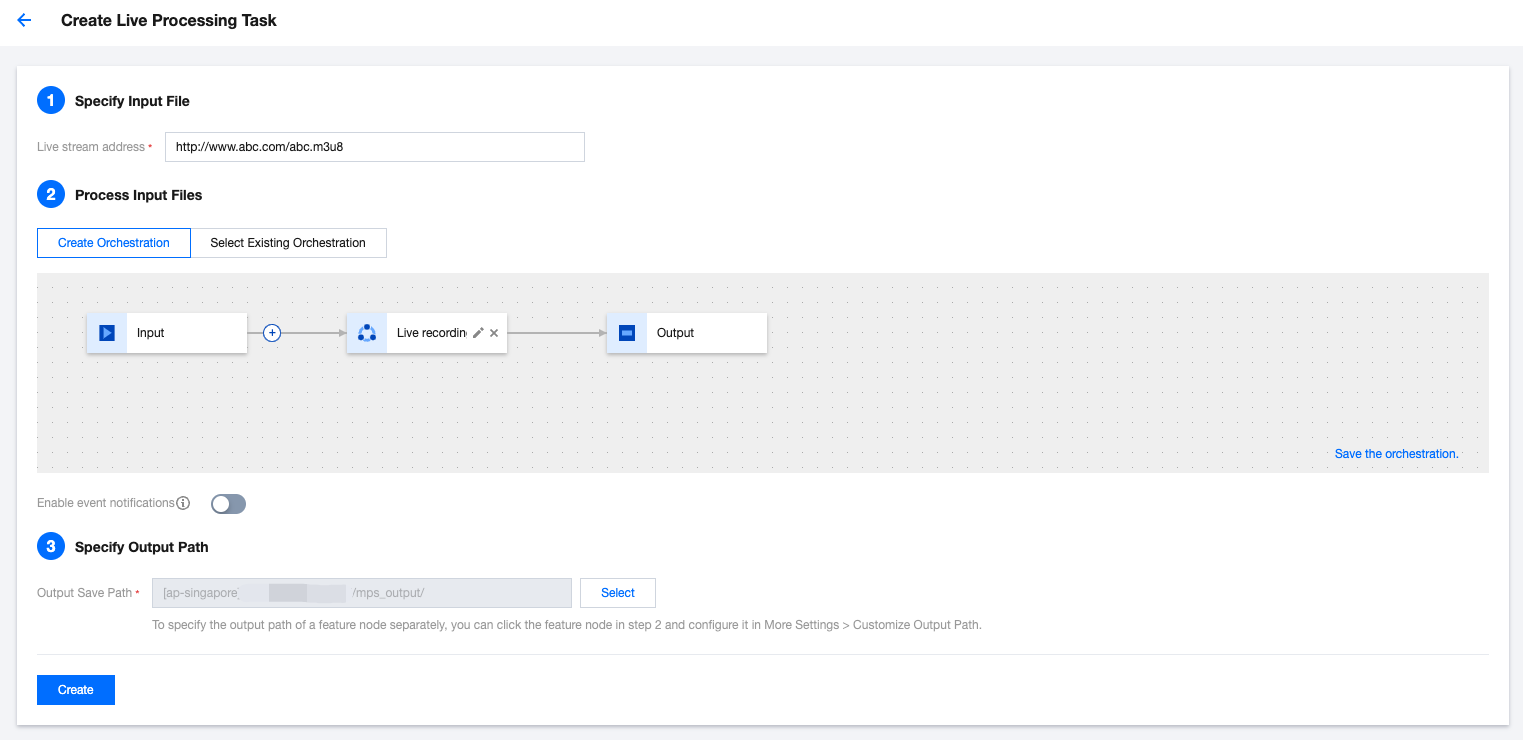
Click Create task, follow the page instructions to configure the live stream address, scheme, and output save path. Currently, the console supports real-time recording of live streams. For detailed template configurations, refer to Live Stream Recording Template.
Note:
Make sure that the entered live stream address is correct when creating the recording task. If the live stream fails to be pulled, the pull operation will be retried three times. If the operation still fails, the recording task status changes to Failed.
Live Task Management
Once the live task has been successfully created, it will be executed automatically. You can perform operations like viewing details or ending the task in the task list.