

End-to-End WebSocket Audio Access
Last updated: 2026-11-17 15:55:54Download PDF
his document is intended for client integrators and describes how to access the end-to-end real-time Speech-to-Speech (S2S) capability of this service over the WebSocket protocol, including URL specifications, authentication flows, complete event protocols, interaction sequences, error codes, and FAQs.
Testing tool: Click to open the testing tool Demo.
Note:
The external protocol of this service is based on the Realtime WebSocket GA event specification, with event names and field structures aligned with GA. Clients written according to the standard Realtime GA SDK can connect for basic conversations.
Key differences from GA: session.created is not sent after the handshake (see 4.1), and different capability series have varying levels of support for certain events (see 2.5).
The server internally provides five capability series:
audio-og-realtime-2.1, audio-og-realtime-2.1mini, audio-og-live-1, audio-s-realtime-3.0, and audio-gg-3.8-live. At runtime, it automatically routes based on customer requests.1. Service Overview
Communication protocol: WebSocket (RFC 6455) over TLS.
wss:// is mandatory for production, and ws:// is for private network debugging only.Message format: Text frames carry JSON events. Binary frames are not accepted and are ignored by the server with a warning. In original protocol passthrough mode (isProxy=1), the original protocol is used.
Audio transport: All audio is placed in the
audio / delta fields of JSON events as base64 strings.Supported capability series:
model Parameter | Location |
audio-og-realtime-2.1 | End-to-end voice conversation, basic capability. |
audio-og-realtime-2.1mini | End-to-end voice conversation, lightweight capability. |
audio-og-live-1 | End-to-end voice conversation, Live capability. |
audio-s-realtime-3.0 | End-to-end voice conversation, enhanced capability. |
audio-gg-3.8-live | End-to-end voice conversation, Live capability (image input supported). |
Note:
Clients can pass in any case (
Audio-OG-realtime-2.1 is equivalent to audio-og-realtime-2.1). The server normalizes it to lowercase during parsing. The canonical values are the lowercase forms in the table above, and the same applies throughout this document.Unified protocol: Different capability series use exactly the same WebSocket event protocol (consistent with the standard OpenAI Realtime protocol). Clients do not need to write branch code for different
model values. Capability differences are handled internally by the server, and unsupported fields are silently ignored or responded to with error(code=not_supported) on control events without interrupting the session.audio-og-live-1 has proprietary protocol extensions (such as delegation mode and context injection) and many downlink event differences (no .done / .completed boundary events, requiring clients to segment by timestamp). It requires separate adaptation. For details, see Chapter 9 . audio-og-live-1 Proprietary Interaction Protocol.
delegation mode (responses mode) requires contacting us to enable.audio-gg-3.8-live follows the standard events and boundary events, but behaviors such as session parameters, interruption, and response.create differ. For details, see audio-gg-3.8-live Integration Guide.
Maximum idle timeout per session: 30 seconds by default, which can be overridden by the
timeoutSec query parameter, with an upper limit of 120 seconds.Fallback when
model is not specified: The server falls back based on the account-level default route. If no match is found, audio-og-realtime-2.1 is used.2. Access URL and Query Parameters
2.1 URL Template
wss://{host}/ete/v1/{appid}?model=<audio-og-realtime-2.1|audio-og-realtime-2.1mini|audio-og-live-1|audio-s-realtime-3.0|audio-gg-3.8-live>&secretId=<TC3 SecretId>&signature=<TC3-HMAC-SHA256 hex>&timeStamp=<unix seconds>&expired=<unix seconds>&nonce=<random integer>&timeoutSec=<session idle timeout in seconds>&isProxy=<0|1>
Note:
host: fixed as mps.tencentcloud.com.appid: the unique identifier of a Tencent Cloud user account (UInt64). You can obtain it from the Account Center console > Account Information page.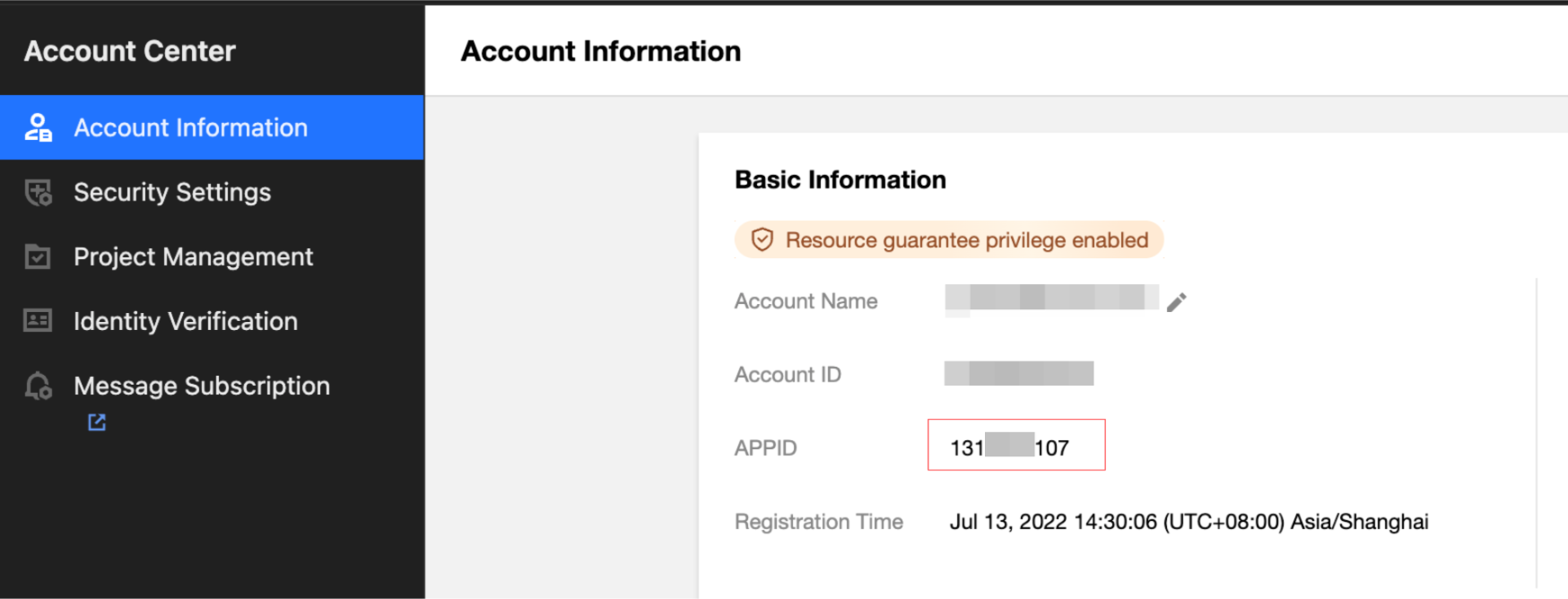
2.2 Path Parameters
Parameter | Required | Description |
appid | Yes | Tencent Cloud AppID, a decimal unsigned integer, passed in through the path /ete/v1/{appid}. If it is not a number, the handshake returns 400; it must be consistent with the AppID of the root account to which secretId belongs, otherwise 401 authentication_failed: code=4111 is returned. |
2.3 Query Parameters
Parameter | Required | Type | Description |
secretId | Yes | string | CAM SecretId. |
signature | Yes | string | |
timeStamp | Yes | int64 | Current UNIX timestamp at the time of signing, in seconds. |
expired | Yes | int64 | UNIX timestamp of the signature expiration time, in seconds. Must be greater than or equal to timeStamp and greater than or equal to now; otherwise, error code 401 invalid_timestamp is returned. |
nonce | Yes | string | Random string (a random integer is recommended), used in signing. Replay prevention is verified by CAM. |
model | No | string | Alias of the capability series. See Service Overview. If not specified, the default route of the account is used as a fallback. In default mode, the value is not verified during the handshake. An invalid value causes the system to return error(code=pipeline_init_failed) and disconnect upon the first session.update. When isProxy=1, the value is verified during the handshake, and an invalid value causes the system to return 400 invalid_request: unsupported model. |
timeoutSec | No | int | Session idle timeout in seconds. Default value: 30. If the value is greater than 120, it is truncated to 120. If the value is less than or equal to 0 or is not a number, it is ignored and the default value 30 is used. |
resId | No | string | Resource ID on the business side, passed through for reconciliation. |
isProxy | No | string | Protocol mode. Only 0 / 1 are accepted. For other values, the system returns 400 invalid_request: invalid param during the handshake.0 or not passed (default): the unified Realtime GA protocol described in this document.1: Original protocol passthrough. The server only performs authentication and rate limiting, and forwards messages as-is. See 2.4.1. |
Note:
Except for the parameters listed in the table above, the server does not read other query parameters. However, any parameter that appears in the URL (except
signature) is included in signature verification.2.4 URL Example
wss://mps.tencentcloud.com/ete/v1/1301234567?model=audio-s-realtime-3.0&secretId=AKIDzxxxxxxxxxxxxxxxxxxxxxxxxxxxxxx&signature=8f2c...4b3a&timeStamp=1735012345&expired=1735015945&nonce=8391023472&timeoutSec=60&resId=order_20260826_0001
2.4.1 Original Protocol Passthrough Mode (isProxy=1)
When the URL parameter
isProxy=1 is set, the server no longer provides the unified Realtime GA protocol. Instead, the client directly uses the original protocol of the model corresponding to each capability series to send and receive messages, and the server forwards them as-is. Authentication, account status checks, and concurrent connection rate limiting during the handshake phase are consistent with the default mode (see Chapter 3 / 11.1).This is suitable for integrators who have completed development based on the model's original protocol and want to directly reuse the original capabilities.
2.4.1.1 How to Enable
wss://mps.tencentcloud.com/ete/v1/1301234567?model=audio-s-realtime-3.0&isProxy=1&secretId=AKIDzxxxxxxxxxxxxxxxxxxxxxxxxxxxxxx&signature=8f2c...4b3a&timeStamp=1735012345&expired=1735015945&nonce=8391023472&timeoutSec=60
isProxy Value | Behavior |
Not passed / 0 | Default mode. The Realtime GA protocol is used uniformly (all content in this document except this section), and the behavior remains unchanged. |
1 | Original protocol passthrough mode (this section). |
Others | The handshake returns 400 invalid_request: invalid param. |
The value of
model is the same as in the default mode (when not passed, the account-level default route is used as a fallback). If the model cannot be recognized, the handshake returns 400 invalid_request: unsupported model.2.5 Model Capability Matrix (Event/Field Support Comparison)
2.5.1 Overview
This section lists the support status of the five external capability series (
audio-og-realtime-2.1, audio-og-realtime-2.1mini, audio-og-live-1, audio-s-realtime-3.0, and audio-gg-3.8-live) for upstream events / downstream events / variable fields / multimodal inputs. The matrix columns are model values and capability points.Note:
✅ : Supported.
⚠️: Partial support or behavior differs from standard GA. See the notes and corresponding sections for details.
❌
not_supported: The server returns error(code=not_supported), and the session is not interrupted.❌ No acknowledgment: The server does not return any events (server logs only). The client should not wait for an acknowledgment.
❌ Not delivered: This downstream event does not occur with this capability.
audio-og-realtime-2.1 and audio-og-realtime-2.1mini behave exactly the same, so they are merged into one column in the following table.2.5.2 Uplink Events (Client → Server)
Event / Capability | audio-og-realtime-2.1(mini) | audio-og-live-1 | audio-s-realtime-3.0 | audio-gg-3.8-live |
session.update (first time) | ✅ Establish a session | ✅ Establish a session | ✅ Establish a session | ✅ Establish a session |
session.update (sent again later) | ⚠️ See the note below. | ⚠️ Same as left | ⚠️ Same as left | ⚠️ Same as left |
input_audio_buffer.append | ✅ | ✅ | ✅ | ✅ |
input_audio_buffer.commit | ✅ | ❌ No receipt (built-in VAD automatically segments). | ✅ | ⚠️ Notify to end the current user input as soon as possible, with no acknowledgment. |
input_audio_buffer.clear | ✅ Clears the audio that has been sent + returns cleared. | ⚠️ Only returns cleared, and the audio that has been sent will not be cleared. | ⚠️ Same as left | ⚠️ Same as left |
response.create (with instructions) | ✅ Used as the instruction for this round of generation. | ⚠️ See 9.1 | ✅ Make the server speak the text. | |
response.create (without instructions) | ✅ Triggers a round of generation. | ⚠️ See 9.1 | ⚠️ Silent no-op (no receipt). | ⚠️ Triggers a reply only if a message was previously appended; otherwise, no-op. |
response.cancel | ✅ | ❌ No receipt (no-op, relies on built-in barge-in). | ✅ | |
conversation.item.create – message / function_call_output | ✅ | ⚠️ See 9.3 | ✅ | ✅(Does not return conversation.item.created). |
conversation.item.create – with input_image | ✅ Data URL / HTTP URL / detail | ❌ not_supported | ❌ not_supported | |
conversation.item.retrieve / delete | ✅ | ❌ No acknowledgment | ✅ | ❌ No acknowledgment |
conversation.item.truncate | ✅ | ❌ not_supported | ❌ not_supported | ❌ not_supported |
output_audio_buffer.clear | ✅ Cancels the current response + returns cleared. | ⚠️ Only returns cleared (does not interrupt the current response). | ✅ Same as the first column | ✅ Same as response.cancel + returns cleared. |
session.close | ✅ | ✅ | ✅ | ✅ |
transcription_session.update | ❌ not_supported | ❌ not_supported | ❌ not_supported | ❌ not_supported |
Other unknown type | Silently ignore | Silently ignore | Silently ignore | Silently ignore |
Note:
The actual behavior of subsequent
session.update messages (consistent across all capabilities): Session parameters take effect once and only once at the first session.update. Any session.update sent after that does not take effect, and voice / instructions / tools / delegation remain unchanged. The server still returns a session.updated message, whose content is a shallow merged echo of all fields submitted by the client, and does not indicate that the changes have taken effect. The only exception is the downstream audio format: each session.update re-validates audio.output.format, and if it is invalid, the server returns unsupported_output_format and disconnects. To change session parameters, re-establish the connection.2.5.3 Downlink Events (Server → Client)
Event | audio-og-realtime-2.1(mini) | audio-og-live-1 | audio-s-realtime-3.0 | audio-gg-3.8-live |
session.updated | ✅ | ✅ | ✅ | ✅ |
input_audio_buffer.speech_started / speech_stopped | ✅ | ❌ Not delivered | ❌ Not delivered | |
input_audio_buffer.committed | ✅ | ❌ Not delivered | ✅ | ⚠️ Not guaranteed to be delivered. Same as above. |
input_audio_buffer.cleared | ✅ | ✅ | ✅ | ✅ |
conversation.item.input_audio_transcription.delta | ✅ | ⚠️ Carries start_ms / end_ms, but does not carry item_id. | ✅ | ✅ |
conversation.item.input_audio_transcription.completed | ✅(May include usage) | ✅ | ✅(Without usage; sent when the assistant starts replying). | |
conversation.item.input_audio_transcription.failed | ❌ Not delivered | ❌ Not delivered | ✅ | ❌ Not delivered |
conversation.item.created | ✅ | ❌ Not delivered | ✅ | ❌ Not delivered |
conversation.item.retrieved / deleted | ✅ | ❌ Not delivered | ✅ | ❌ Not delivered |
response.created | ✅ | ⚠️ See 9.1 | ❌ Not delivered | ✅ |
response.output_item.added / content_part.added | ✅ | ⚠️ Delivered only for function calls. | ✅ | ✅ |
response.output_audio.delta | ✅ | ⚠️ Does not carry item_id / response_id. | ✅ | ✅ |
response.output_audio_transcript.delta | ✅ | ⚠️ Carries start_ms / end_ms, but does not carry item_id / response_id. | ✅ | ✅ |
response.output_audio.done / response.output_audio_transcript.done | ✅ | ❌ Not delivered | ✅ | ✅(Also sent for interrupted or canceled turns). |
response.content_part.done / response.output_item.done | ✅ | ⚠️ Delivered only for function calls. | ✅ | ✅ |
response.done (with usage) | ✅ | ⚠️ Delivered only for responses delegation; not delivered for client delegation. | ✅ | ✅ |
response.function_call_arguments.done | ✅ | ⚠️ Only for responses delegation. | ✅ | ✅ |
response.function_call_arguments.delta | ❌ Not delivered | ❌ Not delivered | ❌ Not delivered | ❌ Not delivered |
output_audio_buffer.started | ❌ Not delivered | ❌ Not delivered | ✅ | ❌ Not delivered |
output_audio_buffer.stopped | ✅ | ❌ Not delivered | ✅ | ✅ |
output_audio_buffer.cleared | ✅ | ✅ | ✅ | ✅ |
session.delegation.created | ❌ Not delivered | ❌ Not delivered | ❌ Not delivered | |
session.closed | ✅ Sent after the client sends session.close. | ✅ Same as left | ✅ Same as left | ✅ Same as left |
rate_limits.updated / response.output_text.* | ❌ Not delivered | ❌ Not delivered | ❌ Not delivered | ❌ Not delivered |
error | ✅ | ✅ | ✅ | ✅ |
2.5.4 session.update Field Support (Effective Only for the First session.update)
Field | audio-og-realtime-2.1(mini) | audio-og-live-1 | audio-s-realtime-3.0 | audio-gg-3.8-live |
instructions | ✅ | ✅ | ✅ | ✅ |
audio.output.voice | ⚠️ Must be in the server-side voice allowlist. Otherwise, the default voice is used. | ✅ No validation. Used directly. | ⚠️ Must be in the built-in voice list (case-insensitive). Otherwise, the default voice is used. | |
audio.input.format / audio.output.format | ✅ See Section 7 | ✅ Same as left | ✅ Same as left | ✅ Same as left |
audio.input.transcription.language | ✅ | ❌ Silently ignored. Language is automatically detected. | ❌ Silently ignored. Language is automatically detected. | ✅ BCP-47 is recommended (such as zh-CN / en-US). |
audio.input.turn_detection(VAD) | ❌ Silently ignored. Determined by the server-side configuration. | ❌ Silently ignored. VAD is forcibly enabled. | ❌ Silently ignored. | ❌ Silently ignored. VAD is forcibly enabled. |
tools | ✅ | ✅ | ✅ Only type=function | |
tool_choice | ❌ Silently ignored | ❌ Silently ignored. Fixed to auto. | ❌ Silently ignored | ❌ Silently ignored |
audio.output.speed / audio.output.loudness | ❌ Silently ignored | ❌ Silently ignored | ✅ | ❌ Silently ignored |
delegation(client / responses) | ❌ Silently ignored | ✅ Exclusive | ❌ Silently ignored | ❌ Silently ignored |
extension (private extensions asr / tts / dialog) | ❌ Silently ignored | ❌ Silently ignored | ✅ | ❌ Silently ignored |
2.5.5 Multimodal Input and Usage Fields
Capability | audio-og-realtime-2.1(mini) | audio-og-live-1 | audio-s-realtime-3.0 | audio-gg-3.8-live |
Audio input | ✅ | ✅ | ✅ | ✅ |
Text input | ✅ | ✅(Effective only for the system / assistant roles under client delegation). | ✅ | ✅ |
Image input ( input_image) | ✅ | ❌ | ❌ | ⚠️ Data URL only (png / jpeg / webp / heic / heif). |
response.done.usage | ⚠️ Included when usage data is available. | ⚠️ Only for responses delegation. | ⚠️ Included when usage data is available. | ⚠️ Included when usage data is available. |
reasoning_tokens / cache_write_tokens | ⚠️ Present when applicable. | ⚠️ Present only for responses delegation and when applicable. | ⚠️ Present when applicable. | ⚠️ Only reasoning_tokens, present when applicable. |
3. Signature
3.1 Query Parameters Involved in Signing
All query parameters except
signature itself are included in the signature (in ascending alphabetical order). This means:The required parameters
secretId / timeStamp / expired / nonce are always included in the signature.Optional parameters (such as
model / timeoutSec / resId) must be included in the signature if you include them in the URL. If they are not included, they do not participate in the signature.The
signature parameter itself is not included in the signature (it is placed in the URL as the signature result).Other business parameters (such as audio format, voice, instructions, and tools) are passed through the
session.update event after a successful handshake, and are unrelated to the URL.3.2 Signing Algorithm
Step 1: Sort and URL-encode the parameters to construct a canonicalized query string.keys = sort(param keys involved in signing) // All query parameters except signaturecanonicalQueryString = keys.map(k => k + '=' + urlEncode(params[k])).join('&')Step 2: Construct a canonicalized request.canonicalRequest ="post" + "\n"+ "/ete/v1/{appid}" + "\n"+ canonicalQueryString + "\n"+ "content-type:application/json; charset=utf-8" + "\n"+ "host:" + host + "\n"+ "" + "\n"+ "content-type;host" + "\n"Step 3: Construct the string to be signed.date = YYYY-MM-DD of UTC(timeStamp)credentialScope = date + "/mps/tc3_request"hashedRequest = hex( SHA-256( canonicalRequest ) )stringToSign = "TC3-HMAC-SHA256" + "\n"+ timeStamp + "\n"+ credentialScope + "\n"+ hashedRequestStep 4: Calculate the derived signing key.kDate = HMAC-SHA256( date, "TC3" + secretKey )kService = HMAC-SHA256( "mps", kDate )kSigning = HMAC-SHA256( "tc3_request", kService )Step 5: Calculate the final signature.signature = hex( HMAC-SHA256( stringToSign, kSigning ) ) // Lowercase hex
3.3 JavaScript Reference Implementation
The
generateSignature() method is implemented by using the browser-native crypto.subtle API. The following excerpt shows the core snippet:async function sign(cfg) {const now = Math.floor(Date.now() / 1000);const expired = now + 3600;const params = {// All query parameters except signature must be included in the signature.model: cfg.model, // Optional. If not passed, it is not added to params.timeStamp: String(now),expired: String(expired),nonce: String(Math.floor(Math.random() * 1e10)),secretId: cfg.secretId,timeoutSec: String(cfg.timeoutSec || 30),// If resId is used, include it and add it to the signature as well:// resId: cfg.resId,};const path = `/ete/v1/${cfg.appid}`;const keys = Object.keys(params).sort();const canonicalQueryString = keys.map((k) => `${k}=${encodeURIComponent(params[k])}`).join('&');const canonicalRequest = ['post', path, canonicalQueryString,'content-type:application/json; charset=utf-8',`host:${cfg.host}`, '', 'content-type;host', '',].join('\n');const hashed = await sha256Hex(canonicalRequest);const date = new Date(now * 1000).toISOString().split('T')[0];const scope = `${date}/mps/tc3_request`;const stringToSign = ['TC3-HMAC-SHA256', String(now), scope, hashed].join('\n');const kDate = await hmacSha256(date, 'TC3' + cfg.secretKey);const kService = await hmacSha256('mps', kDate);const kSigning = await hmacSha256('tc3_request', kService);const signature = bufToHex(await hmacSha256(stringToSign, kSigning));const q = new URLSearchParams(); keys.forEach((k) => q.append(k, params[k]));q.append('signature', signature);return `wss://${cfg.host}${path}?${q.toString()}`;}
3.4 Go Reference Implementation
func sign(host, appID, secretID, secretKey, model string, timeoutSec int) string {now := time.Now().Unix()expired := now + 3600params := map[string]string{"timeStamp": strconv.FormatInt(now, 10),"expired": strconv.FormatInt(expired, 10),"nonce": strconv.Itoa(rand.Intn(1e9)),"secretId": secretID,"timeoutSec": strconv.Itoa(timeoutSec),}if model != "" {params["model"] = model}keys := make([]string, 0, len(params))for k := range params { keys = append(keys, k) }sort.Strings(keys)parts := make([]string, 0, len(keys))for _, k := range keys {parts = append(parts, k+"="+url.QueryEscape(params[k]))}cqs := strings.Join(parts, "&")path := "/ete/v1/" + appIDcanonical := strings.Join([]string{"post", path, cqs,"content-type:application/json; charset=utf-8","host:" + host, "", "content-type;host", "",}, "\n")hashed := sha256Hex([]byte(canonical))date := time.Unix(now, 0).UTC().Format("2006-01-02")scope := date + "/mps/tc3_request"stringToSign := strings.Join([]string{"TC3-HMAC-SHA256", strconv.FormatInt(now, 10), scope, hashed,}, "\n")kDate := hmac256([]byte(date), []byte("TC3"+secretKey))kService := hmac256([]byte("mps"), kDate)kSigning := hmac256([]byte("tc3_request"), kService)signature := hex.EncodeToString(hmac256([]byte(stringToSign), kSigning))q := url.Values{}for k, v := range params { q.Set(k, v) }q.Set("signature", signature)return "wss://" + host + path + "?" + q.Encode()}func sha256Hex(b []byte) string { h := sha256.Sum256(b); return hex.EncodeToString(h[:]) }func hmac256(msg, key []byte) []byte { m := hmac.New(sha256.New, key); m.Write(msg); return m.Sum(nil) }
3.5 Handshake Response for Authentication Failure
The server completes authentication and concurrency checks before the WebSocket handshake upgrade. If any step fails, the request is rejected with an HTTP response and does not enter the WebSocket channel. Therefore, the client does not receive an
error event but instead gets a standard HTTP status code. See Section 11.1.4. Interaction Sequence
4.1 Key Conventions
After a successful handshake, the server does not actively send any events. The first message must be initiated by the client:
The client sends
session.update to complete session initialization, and only then does the server return a session.updated message.Receiving
session.updated indicates that you can start sending audio.4.2 Typical Sequence (Server-Side VAD Mode)
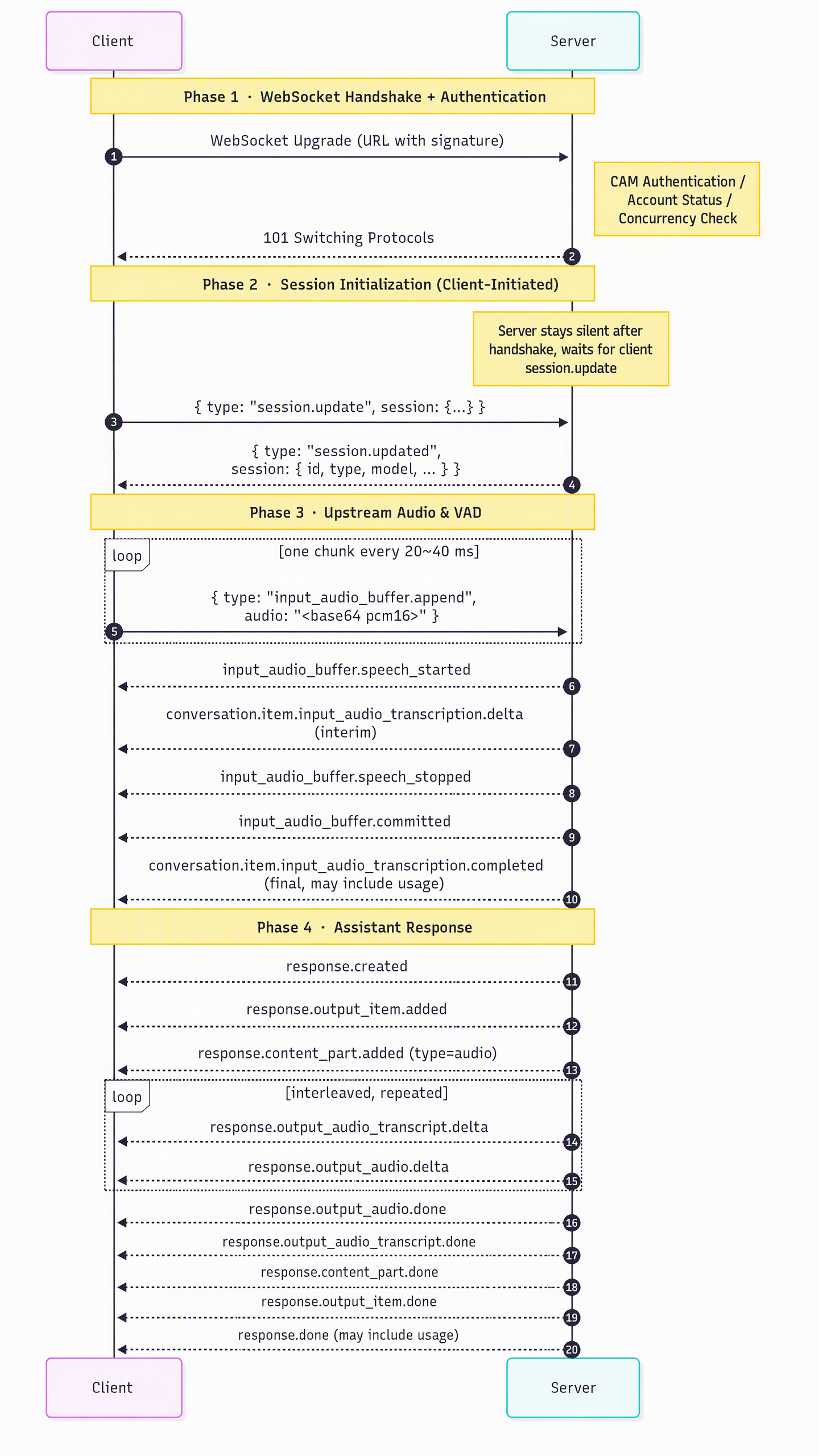
4.3 Interrupting the Current response
The client can send
{"type": "response.cancel"} at any time to interrupt the response that is currently being generated.The server immediately stops sending TTS and returns a
response.done message, where status may be cancelled.5. Uplink Events (Client → Server)
5.1 Event Type Overview
The following table lists only the purpose of each event. For the support and differences of each model for each event, see Section 2.5 Model Capability Matrix.
Event type | Purpose |
session.update | Update session parameters (the first call is equivalent to completing handshake initialization). |
input_audio_buffer.append | Append a segment of user audio (base64-encoded). |
input_audio_buffer.commit | Manually commit the audio buffer (used when server_vad is disabled). |
input_audio_buffer.clear | Clear the uncommitted upstream audio buffer. |
response.create | Actively request the server to generate a response ( instructions can be included for greeting / intervention replies). |
response.cancel | Interrupt the response currently being generated. |
conversation.item.create | Add an item to the conversation context (including function_call_output return). |
conversation.item.retrieve | Request details of a specified item. |
conversation.item.delete | Delete the specified item. |
conversation.item.truncate | Truncate the generated assistant audio (not supported in some scenarios, and an error(not_supported) is returned). |
output_audio_buffer.clear | Clear the current assistant audio playback buffer (the server will synchronously map this to response.cancel). |
transcription_session.update | Update an independent transcription session (currently not supported, and an error(not_supported) is returned). |
session.close | Actively and gracefully close the session. The server will return session.closed with the total session usage and then disconnect (supported by all capabilities, see 9.4 for details). |
Note:
For control events received before the first
session.update: response.create / conversation.item.create / retrieve / delete / truncate return error(code=session_not_ready). input_audio_buffer.append / commit / response.cancel are silently discarded. input_audio_buffer.clear / output_audio_buffer.clear still return cleared. session.close executes the closing process normally. Unknown types are silently ignored.5.2 session.update
{"type": "session.update","session": {"instructions": "You are a professional AI assistant. Speak concisely and in a friendly manner.","audio": {"input": {"format": { "type": "audio/pcm", "rate": 16000 },"transcription": { "language": "zh" }},"output": {"format": { "type": "audio/pcm", "rate": 24000 },"voice": "xxxxxx","speed": 100,"loudness": 100}},"tools": [{"type": "function","name": "get_current_time","description": "Obtain the current system time","parameters": { "type": "object", "properties": {}, "required": [] }}]}}
Field description:
Field | Type | Description |
session.instructions | string | System instructions that override server defaults. |
session.audio.input.format.type | string | |
session.audio.input.format.rate | int | Uplink sample rate (Hz). |
session.audio.input.transcription.language | string | ASR transcription language (ISO 639-1, such as zh / en / ja). If left empty, the server automatically detects it. Some capabilities adapt based on built-in language support, and client-specified values may be ignored. |
session.audio.output.format.type | string | Downlink audio format. |
session.audio.output.format.rate | int | Downlink sample rate (Hz). |
session.audio.output.voice | string | Voice ID. Supports plaintext voice IDs and encrypted voice IDs (generated by the voice encryption service), which the server automatically identifies. If a voice is not applicable to the current session capabilities, the server silently falls back to the default voice (see Q9 for details). |
session.audio.output.speed | int | Speech rate (supported by some capabilities; silently ignored if not supported). |
session.audio.output.loudness | int | Loudness (supported by some capabilities; silently ignored if not supported). |
session.tools | array | Function tool definition that follows the standard GA Function Tool schema (audio-gg-3.8-live supports only type=function; other types are ignored). |
session.delegation | string/object/null | |
session.extension | object | Private extension fields {asr, tts, dialog} (take effect only for audio-s-realtime-3.0; ignored by other capabilities). |
VAD / turn_detection: The server enables
server_vad by default. Custom parameters specified by the client in session.audio.input.turn_detection are adapted by the server on a best-effort basis. The actual effective configuration is subject to the session.updated.session.audio.input.turn_detection receipt.5.3 input_audio_buffer.append
{"type": "input_audio_buffer.append","audio": "<base64-encoded audio chunk>"}
audio is a complete audio payload. The server decodes it according to the format declared in session.audio.input.format.Recommended fragment size: 20 ms to 40 ms (approximately 640 to 1280 bytes before base64 encoding for PCM 16 kHz mono).
append messages sent before the first
session.update are silently discarded.5.4 input_audio_buffer.commit / clear
{ "type": "input_audio_buffer.commit" }{ "type": "input_audio_buffer.clear" }
commit needs to be explicitly called only when server_vad is disabled.clear is used to cancel the current uncommitted user audio. Regardless of whether the capability backend natively supports it, the server sends an input_audio_buffer.cleared event to the client.5.5 response.create / cancel
{"type": "response.create","response": {"instructions": "Hello, I am your AI assistant." // Optional}}{ "type": "response.cancel" }
Semantics of each capability:
Capability | With response.instructions | Without instructions |
audio-og-realtime-2.1(mini) | instructions serve as the generation instruction for this turn (not read verbatim). | Triggers a round of generation. |
audio-s-realtime-3.0 | The server synthesizes the text verbatim (greeting / announcement). | Silent no-op with no receipt. After the function call is returned, generation resumes automatically, so no sending is required. |
audio-og-live-1(client delegation) | The server makes the model speak the text. | Returns error(code=not_supported). |
audio-og-live-1(responses delegation) | Triggers continued generation, and instructions are discarded. | Continue generation. Must be sent after the function call is returned. |
audio-gg-3.8-live | instructions serve as a user text input, and the model replies accordingly (not read verbatim). | Triggers a reply if a message was previously appended through conversation.item.create; otherwise, remains a silent no-op. |
Fields supported by
response.create (only audio-og-realtime-2.1(mini) supports fields other than instructions):Field | Type | Description |
response.instructions | string | See the table above. |
response.voice | string | Voice temporarily overridden for this turn (optional). |
response.modalities | []string | Output modalities for this turn (optional, standard GA semantics). |
response.metadata | object | Metadata (optional). |
5.6 conversation.item.create
Use case 1: Append a user / assistant message
{"type": "conversation.item.create","item": {"type": "message","role": "user","content": [{ "type": "input_text", "text": "Check today's weather in Shenzhen for me" }]}}
{"type": "conversation.item.create","item": {"type": "function_call_output","call_id": "call_abc123","output": "2026-08-26 09:30:00"}}
Use case 3: Image input (multimodal)
Mixing
input_text and input_image content blocks in the same user message allows the model to answer questions based on the image. Currently, only audio-og-realtime-2.1 / audio-og-realtime-2.1mini /audio-gg-3.8-live support image input. Other model values return an error(code=not_supported) when they receive an item containing input_image.Note:
audio-gg-3.8-live supports only format A (Data URL), with different format and size limits, and does not send a receipt for conversation.item.created. See 10.5.Format A: Data URL (recommended, no external URL exposure required)
{"type": "conversation.item.create","item": {"type": "message","role": "user","content": [{ "type": "input_text", "text": "Please describe the key information in this image" },{ "type": "input_image", "image_url": "data:image/jpeg;base64,/9j/4AAQSkZJRg...","detail": "auto" }]}}
Format B: HTTP(S) URL
{"type": "conversation.item.create","item": {"type": "message","role": "user","content": [{ "type": "input_text", "text": "Help me identify the error code in this screenshot" },{ "type": "input_image", "image_url": "https://example.com/foo.png","detail": "high" }]}}
Field description:
Field | Type | Required | Description |
type | string | Yes | Fixed "input_image". |
image_url | string | Yes | Data URL ( data:image/{jpeg,png,gif,webp};base64,...) or HTTP/HTTPS URL. |
detail | string | No | "auto" (default) / "low" / "high". low uses fewer tokens for faster responses; high provides higher resolution and better detail recognition but consumes more tokens. |
Sequence after sending:
1. Server confirmation:
conversation.item.created.2. The client must actively trigger a response:
{"type": "response.create"} (because image messages do not automatically trigger VAD like voice messages do).3. The server sends the regular
response.output_audio.delta / response.output_audio_transcript.delta / response.done events.Image tokens are counted toward the
response.done.response.usage.input_tokens total. Image tokens with detail=high are significantly higher than those with detail=low.Limitations and recommendations:
It is recommended to keep the number of images per message at 4 or fewer to avoid slow responses caused by oversized messages.
It is recommended that a single Data URL be no larger than 2 MB (no larger than 2.7 MB after base64 encoding). Oversized Data URLs may be rejected.
The HTTP URL must be publicly accessible. Private resources with authentication headers are not supported.
For animated images (gif), only the first frame may be extracted, without frame-by-frame understanding.
Image input does not occupy the audio channel of a voice session. It can be used in parallel with
input_audio_buffer.append continuously fed by the microphone.5.7 conversation.item.retrieve / delete / truncate
{ "type": "conversation.item.retrieve", "item_id": "item_xxx" }{ "type": "conversation.item.delete", "item_id": "item_xxx" }{ "type": "conversation.item.truncate", "item_id": "item_xxx","content_index": 0, "audio_end_ms": 1500 }
Attention:
When item_id is missing in a retrieve / delete operation, an error is returned with code=missing_item_id.
retrieve / delete are not supported under audio-og-live-1 / audio-gg-3.8-live, and no events are returned.
An error (code=not_supported) is returned for truncate under audio-og-live-1 / audio-s-realtime-3.0 / audio-gg-3.8-live. For alternatives, see Q6.
5.8 output_audio_buffer.clear
{ "type": "output_audio_buffer.clear" }
The server will:
1. Internally trigger
response.cancel once to interrupt the current TTS.2. Return an
output_audio_buffer.cleared event, based on which the client clears the local audio playback buffer.6. Downlink Events (Server → Client)
6.1 Complete Event List
The following table lists only the trigger timing of each event. For the support of each
model for each event, see 2.5 Model Capability Matrix.Event type | Trigger Timing |
session.updated | Echoed each time session.update is received; the first time is the first downstream event after the handshake. |
error | Invalid parameter / Backend service exception / Unsupported capability. |
conversation.item.created | An item is added to the conversation context (server confirmation receipt). |
conversation.item.retrieved | Responds to conversation.item.retrieve. |
conversation.item.deleted | Responds to conversation.item.delete. |
conversation.item.input_audio_transcription.delta | Incremental user ASR transcription (unstable). |
conversation.item.input_audio_transcription.completed | Stable user ASR transcription (may include usage). |
conversation.item.input_audio_transcription.failed | User ASR transcription failed. |
input_audio_buffer.committed | A user utterance is committed to the audio buffer (triggered by VAD or committed by the client). |
input_audio_buffer.cleared | Responds to input_audio_buffer.clear. |
input_audio_buffer.speech_started | Server-side VAD detects that the user starts speaking. |
input_audio_buffer.speech_stopped | Server-side VAD detects that the user stops speaking. |
response.created | A response starts to be generated. |
response.output_item.added | Adds an output_item to the response ( message / function_call). |
response.content_part.added | Adds a content part to the output_item ( audio / text). |
response.output_audio.delta | Assistant audio delta (base64). |
response.output_audio.done | Assistant audio ends. |
response.output_audio_transcript.delta | Assistant audio transcript delta. |
response.output_audio_transcript.done | Assistant audio transcript finalized. |
response.function_call_arguments.done | Function call arguments are delivered in full, without sending .delta increments. |
response.content_part.done | The content part ends. |
response.output_item.done | The output_item ends. |
response.done | A response ends completely (possibly carrying usage; when it is interrupted, status=cancelled). |
output_audio_buffer.started | The server starts delivering assistant audio. |
output_audio_buffer.stopped | The server finishes a segment of assistant audio. |
output_audio_buffer.cleared | Responds to the client's output_audio_buffer.clear. |
session.delegation.created | |
session.closed | Sent once after the client actively sends session.close, carrying reason / usage / session_duration_seconds (see 9.4 for details). |
Note:
rate_limits.updated, response.output_text.*, response.function_call_arguments.delta, session.created, and conversation.created are not sent currently.The server downlink queue has a capacity of 1024 events. When the client consumes events too slowly and causes a backlog overflow, new events are silently discarded.
6.2 session.updated
{"type": "session.updated","event_id": "evt_xxxxxxxx","session": {"id": "sess_xxxxxxxx","type": "realtime","model": "audio-s-realtime-3.0","audio": { "input": {...}, "output": {...} },"instructions": "..."}}
The client should start sending
input_audio_buffer.append only after receiving this event.The
session object is a shallow merged echo of the session fields from all previous session.update messages sent by the client. The server only supplements three fields: id (session ID), type (fixed as realtime), and model, which does not represent the configuration that actually takes effect. The value rule for model is as follows: if the client passes it in session.model, it is echoed back as-is. Otherwise, it comes from the URL parameter. If the model URL parameter is not specified, model is explicitly set to audio-og-realtime-2.1. Note that the capability that actually takes effect may be another capability selected by the account's default routing. Clients should not rely on this field to determine the actual capability, and it is recommended to always explicitly pass model in the URL.6.3 User ASR Events
{"type": "conversation.item.input_audio_transcription.delta","event_id": "evt_xxx", "item_id": "item_xxx","content_index": 0, "delta": "Shenzhen","start_ms": 1240, "end_ms": 1560}{"type": "conversation.item.input_audio_transcription.completed","event_id": "evt_xxx", "item_id": "item_xxx","content_index": 0, "transcript": "How is the weather in Shenzhen today","usage": { "type": "duration", "seconds": 2 }}
The
usage field carries the usage of this ASR transcription (type="duration" + seconds) and can be used for local cost observation on the client side. Currently, only audio-og-realtime-2.1(mini) may carry it, and it is omitted in other cases (omitempty). Clients should treat this field as optional for compatibility.start_ms / end_ms are the start and end millisecond offsets of the audio corresponding to the delta on the session timeline, with the session start as the zero point. They are carried only by audio-og-live-1, and the fields are omitted when the value is 0. Under this capability, delta does not carry item_id, and the server does not send transcription.completed. Clients need to merge complete utterances by themselves based on the gaps between start_ms / end_ms. For details, see 9.5. Other capabilities send completed normally and do not carry these two fields.The ASR delta of
audio-s-realtime-3.0 is append-only incremental. If previously recognized text is corrected during recognition, the delta may be empty and skipped, and the final result is based on completed.transcript.transcription.completed.usage and response.done.response.usage (token usage) are two independent and parallel usage fields: the former is recorded by ASR audio transcription seconds, and the latter is recorded by response token usage. They have different dimensions and cannot be converted to each other.6.4 Assistant Audio/Text Events
{"type": "response.output_audio.delta","event_id": "evt_xxx","response_id": "resp_xxx","item_id": "item_xxx","output_index": 0, "content_index": 0,"delta": "<base64 pcm16 / opus chunk>"}{"type": "response.output_audio_transcript.delta","event_id": "evt_xxx","response_id": "resp_xxx","item_id": "item_xxx","delta": "Shenzhen"}
Note:
Under
audio-og-live-1, these two events do not carry response_id / item_id, while transcript delta additionally carries start_ms / end_ms. See 9.5. When parsing is performed on the client side, treat item_id as an optional field.6.5 response.done
{"type": "response.done","event_id": "evt_xxx","response": {"id": "resp_xxx","status": "completed","usage": {"total_tokens": 123,"input_tokens": 45,"output_tokens": 78,"input_token_details": {"text_tokens": 20,"audio_tokens": 15,"cached_tokens": 10,"cached_tokens_details": {"text_tokens": 6,"audio_tokens": 4}},"output_token_details": {"text_tokens": 30,"audio_tokens": 48,"reasoning_tokens": 25}}}}
Note:
reasoning_tokens (sent only by models with reasoning capabilities) represents the reasoning tokens of the current response and is a subset of output_token_details.text_tokens (not parallel to text / audio). It exists only when applicable, and is 0 or omitted under other capabilities. input_token_details.cache_write_tokens represents the tokens written to the prompt cache for the first time (mutually exclusive with cached_tokens hits).status values: audio-og-realtime-2.1(mini) has completed / cancelled / failed / incomplete; audio-s-realtime-3.0 / audio-gg-3.8-live have only completed / cancelled; audio-og-live-1 defaults to completed.response.usage carries the token usage details of the current response, with a field structure aligned with the standard Realtime GA. When no usage data is available, this field is omitted (omitempty). Clients can use it for local usage observation.6.6 error
{"type": "error","event_id": "evt_xxx","error": {"type": "invalid_request_error","code": "unsupported_output_format","message": "unsupported opus output rate 44100, allowed: 8000/12000/16000/24000/48000","event_id": "The event_id of the original event that triggered this error on the client"}}
After the following errors occur, the server will actively close the connection:
unsupported_output_format / pipeline_init_failed / upstream_send_error / upstream_error / upstream_closed. When an idle timeout (idle_timeout) occurs, the server closes the connection directly, and the client usually does not receive this error event. The client should use the WebSocket close as the basis for judgment. For the complete list of error codes, see 11.1.7. Audio Formats and Sample Rates
7.1 Uplink Audio (Input)
Format ( format.type) | Description | Supported Sample Rate |
pcm / audio/pcm / pcm16 / pcm_s16le / s16le | 16-bit signed LE mono PCM | Any (16000 recommended) |
opus / audio/opus | Raw Opus packet (each append carries a complete packet) | 8k / 12k / 16k / 24k / 48k |
7.2 Downlink Audio (Output)
Format | Supported Sample Rate | Remarks |
pcm | Any | The server resamples audio as needed to the sample rate declared by the client. |
opus | 8k / 12k / 16k / 24k / 48k | The server encodes audio into raw Opus packets; each response.output_audio.delta.delta typically corresponds to a 20 ms Opus frame. |
Compatible MIME aliases: Clients can declare PCM using any of
audio/pcm / pcm / pcm16 / pcm_s16le, and declare Opus using audio/opus / opus. The server normalizes them automatically.7.3 Server Downlink Policy
When a session is established, the server automatically selects the optimal downstream link based on the
session.audio.output.format declared by the client, either direct pass-through or server-side resampling/format conversion, without client awareness.The client only needs to ensure that
format / rate fall within the valid ranges declared in the tables in 7.1 / 7.2. The actual format that takes effect is provided in session.updated.session.audio.8. Complete Function Call Flow
8.1 Sequence

Whether
response.create is required after the tool result is returned:Capability | Required or Not | Description |
audio-og-realtime-2.1(mini) | Required | Follows standard GA semantics. After returning the result, send {"type":"response.create"}. |
audio-s-realtime-3.0 | Not required. | After tool results are received, generation resumes automatically. Sending an empty response.create has no side effects (no-op). |
audio-og-live-1(responses delegation) | Required | Does not resume automatically. After all parallel calls are returned, send once more. |
audio-og-live-1(client delegation) | --- | Does not trigger function calls. See 9.2. |
audio-gg-3.8-live | Not required. | After tool results are received, generation resumes automatically (a new response). Sending an empty response.create has no side effects (no-op). |
Note:
Unified recommendation: After every
function_call_output is returned, send a response.create without instructions to be compatible with all the above capabilities.8.2 Key Fields
Downstream
response.function_call_arguments.done:{"type": "response.function_call_arguments.done","event_id": "evt_xxx","response_id": "resp_xxx","item_id": "item_xxx","call_id": "call_abc123","name": "get_current_time","arguments": "{}"}
Uplink
conversation.item.create return:{"type": "conversation.item.create","item": {"type": "function_call_output","call_id": "call_abc123","output": "2026-08-26 09:30:00"}}
Note:
Clients can send messages following the standard Realtime GA semantics. To be compatible with all capabilities, handle continuations according to the "Unified recommendation" in the table above. When
audio-s-realtime-3.0 triggers multiple calls in one turn, the server splits them into multiple function_call_arguments.done events (events under this capability do not carry item_id), and each call must be returned separately. audio-gg-3.8-live may trigger multiple calls in one turn, and each call must be returned separately. The turn that triggers the function call first sends response.done, and the continuation reply is a new response_id.8.3 Complete Runnable Example
Select the "Enable Demo Tool" checkbox on the left.
Ask "What time is it now?".
Observe the complete function call sequence in the runtime logs.
9. Dedicated Interaction Protocol for audio-og-live-1
This chapter focuses on the behavioral differences and dedicated protocol extensions of
audio-og-live-1 compared with other capability series. Event names and field structures still follow Realtime GA, but this capability lacks several types of boundary events, and some control events have different semantics. Clients need to perform dedicated adaptation as described in this chapter, mainly by segmenting utterances based on timestamps and handling tool calls and context injection in delegation mode.9.1 Protocol Compatibility Overview
Session parameters take effect only once:
voice / instructions / tools / delegation all take effect at the first session.update, and subsequent session.update messages do not take effect (consistent across all capabilities, see 2.5.1). To change them, restart the session.Actual behavior of uplink control events:
Event | Behavior |
input_audio_buffer.commit | Not supported. No receipt (built-in VAD automatically segments turns). |
input_audio_buffer.clear | Only responds with input_audio_buffer.cleared. Audio that has already been sent will not be cleared. |
response.cancel | no-op. No receipt (built-in barge-in automatically interrupts when the user speaks). |
output_audio_buffer.clear | Only responds with output_audio_buffer.cleared. The current response will not be interrupted. |
response.create | client delegation: with instructions, the model speaks the text; without them, returns not_supported. responses delegation: triggers continued generation (instructions are discarded). |
conversation.item.create | See section 9.3. Returns not_supported when input_image is included. |
conversation.item.retrieve / delete | Not supported. No receipt. |
conversation.item.truncate | Returns error(code=not_supported). |
VAD is always enabled: Built-in voice endpoint detection cannot be disabled, and
turn_detection is ignored.Boundary events for ASR / assistant text are not sent:
conversation.item.input_audio_transcription.completed and response.output_audio.done are not sent.response.output_audio_transcript.done, speech_started / speech_stopped, and input_audio_buffer.committed. User ASR deltas and assistant transcript deltas additionally carry start_ms / end_ms (millisecond offsets from the session start). Clients segment utterances by gaps. See 9.5.delta events do not carry item_id / response_id: This capability is a continuous stream model and has no item dimension.conversation.item.input_audio_transcription.delta does not carry item_id.response.output_audio_transcript.delta / response.output_audio.delta do not carry item_id / response_id.The client presentation layer should group data based on
start_ms / end_ms (for example, generate client-asr-${serial} / client-llm-${serial} locally). Events related to function_call still carry item_id / call_id.response.created / response.done:responses delegation: Sent only once when the first assistant delta of the session arrives. response.done is not sent.client delegation: response.created is sent, and no further events are sent after that. response.done is not sent. The client should determine the end of each response turn based on transcript timestamps.9.2 Delegation Mode (The responses mode is not supported by default. To enable it, contact us.)
audio-og-live-1 has two delegation modes, which clients can declare through the session.delegation field in the first session.update. The core difference between the two is whether function call is supported:Mode | function call | Context Injection | Scenario |
responses | ✅ The model delegates tool reasoning to the server-side tool reasoning service, which sends function_call_arguments.done. The client executes the tool call and returns the result. | ❌ | Requires calling external tools (weather, query, local data). |
client | ❌ Does not trigger function calls. tools is ignored. | ✅ Injected through conversation.item.create(role=system/assistant). | Pure voice conversation, with background information actively injected by the client. |
Note:
To use
responses mode, tool reasoning must be enabled for the account. If it is not configured, the first session.update returns error(code=pipeline_init_failed) and the connection is closed.Comparison of interaction sequences between the two modes:
responses mode (requires returning the tool result and then sending response.create):
client mode (no function call, with background information injected by the client):
9.2.1 Explicit Declaration
The following formats are supported (values are case-insensitive):
// Abbreviation{ "type": "session.update", "session": { "delegation": "responses" } }// Native object (only the type field is read){ "type": "session.update", "session": { "delegation": { "type": "responses" } } }// Explicit null: force client mode (overrides the account default configuration){ "type": "session.update", "session": { "delegation": null } }
An invalid value (neither
client nor responses) is treated as undeclared and goes to the next level of automatic decision-making without causing session rejection.9.2.2 Automatic Decision Priority
The server selects a mode in the following order of priority (high to low):
1. The
session.delegation explicitly declared by the client (including explicit null → client).2. If
session.tools is not empty, responses is used.3. Default configuration at the account level.
4. Fall back to
client.Decision Process Visualization:

9.2.3 Boundary Behavior
If the client declares
client but also provides session.tools, the client's choice is respected and client is used. tools is ignored (with only a server-side warning logged) without blocking the session.If
responses is ultimately selected but tool reasoning is not enabled for the account, the first session.update returns error(code=pipeline_init_failed) and the connection is closed. In this case, switch to client mode or contact the administrator to enable it.In
responses mode, tool_choice is fixed to auto, and the tool_choice passed in by the client is ignored.9.3 Context Injection in client Mode
In
client mode, the client can inject context into the model through conversation.item.create at any time without waiting for a server request. The model sends a request when external information is needed.When
session.delegation.created is sent with target=client, the client can supplement context accordingly, but this is not required.The server automatically attaches the delegation ID of the most recent
target=client to the injected content. If no such delegation ID has been received, the content is injected as session-level context. The client does not need to and cannot specify delegation_id (if this field is included in an item, it is ignored).Note:
In
responses mode, the item of conversation.item.create is processed according to standard semantics (for example, used to return function_call_output), and no role mapping from the following table is performed.9.3.1 Supported role Semantics
item.role | Description | Scenario |
system | Silent context that the model uses as a basis for reasoning but does not actively read out. | Inject user profiles, time and location, external query results, and so on. |
assistant | A message that the model proactively speaks. | Customize opening remarks and broadcast event notifications. |
user / Other / Default (such as function_call_output) | Ignored, no receipt (server-side logs only). | --- |
Note:
In this mode, the server does not send
conversation.item.created. Items with empty text are also ignored without acknowledgment.Complete closed-loop sequence for context injection:

Attention:
The difference between the
system and assistant roles is as follows: system is silent injection (the model thinks but does not speak), while assistant is active speaking (the model immediately synthesizes speech using TTS).9.3.2 Syntax of item.content
Two GA-compatible formats are supported (equivalent):
// Method A: input_text (recommended)"content": [{ "type": "input_text", "text": "..." }]// Method B: text"content": [{ "type": "text", "text": "..." }]
The
text of multiple content blocks is directly concatenated by the server into a single string without a delimiter. Any portion exceeding 1800 characters after concatenation is truncated (the limit for a single injection is approximately 500 tokens). If the content contains input_image, the entire item returns error(code=not_supported).9.3.3 Complete Example
Example A: Injecting a user profile as silent background
{"type": "conversation.item.create","item": {"type": "message","role": "system","content": [{ "type": "input_text","text": "User identity: VIP; Language preference: Chinese; Keep the reply brief" }]}}
Effect: The model considers this information in subsequent responses but does not actively speak it out.
Example B: Making the model proactively greet the user
{"type": "conversation.item.create","item": {"type": "message","role": "assistant","content": [{ "type": "input_text","text": "Hello, I am your AI assistant. How can I help you?" }]}}
Effect: The model immediately speaks this text using TTS.
Example C: Injecting external query results
{"type": "conversation.item.create","item": {"type": "message","role": "system","content": [{ "type": "input_text","text": "Beijing is currently sunny, 25°C, humidity 40%" }]}}
Effect: The model continues the conversation based on the new information, for example, by answering "What should I wear today?".
9.4 Graceful Shutdown and Final Usage
Note:
Scope of application: The protocols in this section (
session.close / session.closed) are private extensions of this service and are supported by all four capabilities. They are included in this chapter only for historical reasons.The client can send
session.close before disconnecting the WebSocket to have the server return the total usage of this session.Under the standard Realtime GA protocol, the client cannot perceive the total session-level consumption on the server by directly calling
ws.close().9.4.1 Upstream session.close
Sent when the client proactively closes the session:
{ "type": "session.close" }
No other fields. After the server receives it, it will:
1. Stop subsequent upstream processing;
2. Close the current session:
audio-og-realtime-2.1(mini) / audio-s-realtime-3.0 / audio-gg-3.8-live: If a response is in progress, execute response.cancel once first (the current reply will be interrupted), then wait up to 10 seconds to receive the response.done for that turn to add the final round of usage.audio-og-live-1: Wait for the model side to end the session, up to 10 seconds (without interrupting the current reply).3. A session.closed
event is sent once, carrying the total usage of this session.4. Close the WebSocket connection.
Therefore, it may take up to about 10 seconds from sending
session.close to receiving session.closed. If session.close is sent before the first session.update, session.closed will still be received normally (with usage of 0).9.4.2 Downstream session.closed
{"type": "session.closed","event_id": "evt_xxx","reason": "client_request","session_duration_seconds": 87.3,"usage": {"total_tokens": 1488,"input_tokens": 1442,"output_tokens": 46,"input_token_details": {"cached_tokens": 0,"cache_write_tokens": 0},"output_token_details": {"reasoning_tokens": 11}}}
Field semantics:
reason: Currently fixed to client_request. In scenarios where the server proactively disconnects, such as idle timeout or internal server exceptions, session.closed will not be delivered to the client, and the client can only observe the WebSocket close.session_duration_seconds: Session duration in seconds. For audio-og-live-1, the session duration counted on the model side takes precedence. For other capabilities or when this statistic is unavailable, the duration is calculated based on the accumulated upstream audio duration (for Opus upstream, the decoded duration is used).usage: The cumulative value of response.done.response.usage across all turns in the session, with a field structure consistent with it (including reasoning_tokens / cache_write_tokens details). This field always exists. Under client delegation of audio-og-live-1 or when no token usage has ever occurred, each field is 0.9.4.3 Recommended Process

Fallback recommendation: The server-side cleanup takes up to about 10 seconds. After the client sends
session.close, it is recommended to start a timer slightly longer than 10 seconds (for example, 12 seconds). If session.closed is not received within the timeout period (for example, due to a network exception), proactively call ws.close() to prevent the UI from freezing. If your business prioritizes disconnection speed over obtaining the total usage, you can shorten this timer at the cost of potentially not receiving session.closed. The disconnect() function on the test page is a reference implementation of this process (with a timer of 5 seconds).Attention:
If the client directly calls
ws.close() without sending session.close, the server cannot deliver session.closed, but the total session usage will still be fully counted on the server side. To obtain it, contact the administrator with the session ID.9.5 Client-Side Sentence Segmentation for ASR/Assistant Text
audio-og-live-1 is a "continuous stream" model. The delta boundaries between user ASR and assistant transcript only reflect the audio rhythm, not semantic turn boundaries. The server forwards the start_ms / end_ms carried by each delta (millisecond offsets with the session start as the zero point) as is to the client, and does not synthesize .completed / .done boundary events on the server side.9.5.1 Scope of Impact
Events that are affected by this policy and not delivered under
audio-og-live-1:conversation.item.input_audio_transcription.completedconversation.item.input_audio_transcription.failedinput_audio_buffer.speech_started / .speech_stoppedinput_audio_buffer.committedresponse.output_audio.doneresponse.output_audio_transcript.doneDownstream events that additionally carry
start_ms / end_ms and do not carry item_id / response_id:conversation.item.input_audio_transcription.delta (user ASR)response.output_audio_transcript.delta (assistant transcript)response.output_audio.delta (assistant audio; carries start_ms / end_ms, but no ID)Note:
When
start_ms / end_ms is 0, the field is omitted, and the client should treat it as 0 by default.9.5.2 Recommended Client-Side Sentence Segmentation Algorithm
Maintain
{ curItemID, lastEndMs }:curItemID is the local ID of the utterance currently being synthesized.lastEndMs is the end_ms of the last delta in the current utterance.When a new delta
{ start_ms, end_ms, delta } is received:If
curItemID is empty or start_ms - lastEndMs > GAP_MS (empirical value: 600 to 1000 ms):Consider the previous utterance as ended, and mark the UI entry corresponding to
curItemID as stable.Assign a new
curItemID (for example, client-asr-${serial} or client-llm-${serial}).Append
delta to the buffer of curItemID, and refresh the UI to the non-stable state.Update
lastEndMs = end_ms.The ASR and assistant transcript channels are independent of each other, and each maintains its own state.
Note:
Other capability series are not affected:
audio-og-realtime-2.1(mini) and audio-s-realtime-3.0 still deliver complete .completed / .done events according to the standard Realtime GA. start_ms / end_ms are not guaranteed to exist, so the client should handle them by capability series: if a received delta contains start_ms, use timestamp-based segmentation. Otherwise, rely on the .completed / .done stable-state events.9.5.3 Reference Implementation
The browser test page contains two symmetric minimal reference implementations (both with
gapMs = 800):handleClientSynthAsrDelta(): Generates a local ID client-asr-${serial} when the user's ASR segment ends.handleClientSynthAssistantDelta(): Generates a local ID client-llm-${serial} when the assistant text segment ends.Both functions share the same template: switch entries when
start_ms - lastEndMs > gapMs, mark the previous entry as stable, and then open a new entry.9.6 Complete Interaction Sequence (client/responses Modes)
The downstream sequence of
audio-og-live-1 has several key differences compared with the typical sequence in 4.2: it does not send transcription.completed / speech_started / speech_stopped / input_audio_buffer.committed / response.output_audio.done / response.output_audio_transcript.done. All ASR and assistant transcripts are deltaAdditionally carry
start_ms / end_ms. The behavior of response.done varies depending on delegation.type. This section provides the complete sequences for both modes.Convention:
The following sequence omits the "WebSocket handshake + authentication" phase already shown in 4.2 and only illustrates the business flow starting from
session.update.output_audio.delta is actually a high-frequency event (with adjacent intervals of approximately 200 ms). In the sequence diagram, only one loop is shown to represent this continuous stream.The sequence order is the actual delivery order. The trigger point of
response.done and the final packet of output_audio.delta are not guaranteed to be strictly ordered (the server no longer performs idle alignment, and the client should tolerate the arrival of the final output_audio.delta packet after response.done. See 9.5).9.6.1 client delegation Mode
The model performs inference and TTS on its own. When external information is needed, it sends
session.delegation.created (target=client), and the client can feed information back through conversation.item.create(role=system/assistant). In this mode, response.done is not sent, and response.created is sent only once in the first turn of the session. The client determines turn boundaries on its own based on the timestamp gap between start_ms / end_ms in ASR / assistant transcripts.
9.6.2 responses delegation Mode
The model delegates tool inference to the server-side tool inference service. When each round of inference is completed, the server immediately sends a
response.done event (including token usage). In multi-round function_call scenarios, each round independently sends a response.done event to pass function_call_output. After that, response.create must be sent again for the function_call_output to continue.
9.6.3 Quick Comparison of the Two Modes
Dimension | client delegation | responses delegation |
Tool reasoning | ❌ None | ✅ Server-side tool reasoning service |
Tool capability | ❌ Not supported ( tools is ignored). | ✅ Supports tools + function_call |
Context injection | ✅ conversation.item.create(role=system/assistant) | ❌ Items are processed according to standard semantics (used to return function_call_output). |
session.delegation.created | target: "client" | target: "responses" |
response.created | Only once in the first session turn | Once per round |
response.done delivery | ❌ Not delivered (the client performs sentence segmentation on its own). | ✅ Sent immediately after each round of inference is completed. |
Token usage | ❌ None (all fields in session.closed.usage are 0). | ✅ response.done.response.usage carries the tokens for each round. |
Typical applicable scenarios | Quick integration and conversations that depend on client state | Requires querying external tools (weather, stock prices, local data) |
9.7 Quick Reference for Comparison with Other Capability Series
The complete model × event support matrix is provided in 2.5 Model Capability Matrix. This section only describes the most important behavioral differences of
audio-og-live-1:VAD is forcibly enabled:
turn_detection is ignored. input_audio_buffer.commit and response.cancel are no-ops without receipts, and turn segmentation and barge-in are handled automatically by the built-in VAD. output_audio_buffer.clear only returns cleared and cannot interrupt the current response.The semantics of
response.create vary depending on the delegation. See 9.1.The semantics of
response.done differ: it is sent immediately when each round of inference is completed only under responses delegation, including token usage. It is not sent under client delegation.\nBoundary events for ASR / assistant text are not sent:
transcription.completed / speech_started / speech_stopped / input_audio_buffer.committed / response.output_audio.done / response.output_audio_transcript.done are all not sent. ASR / assistant transcript delta additionally carries start_ms / end_ms, and the client performs sentence segmentation on its own. See 9.5.\nProprietary protocol extensions:
session.delegation: dual modes of client / responses (see 9.2).conversation.item.create is used for context injection in client mode (see 9.3).session.delegation.created is a downstream event.Image input is not supported: an
input_image content block directly returns not_supported. The image part is not silently discarded and text-only processing is not used. If image capability is required, switch to audio-og-realtime-2.1(mini) or audio-gg-3.8-live.Non-fatal errors are not sent: non-fatal errors on the model side (such as tool inference service exceptions) are only logged on the server, and the session continues (tool calls may become invalid). The client receives
upstream_error / upstream_closed and disconnects only when a connection-level exception occurs.10. audio-gg-3.8-live Access Instructions
audio-gg-3.8-live follows the standard Realtime GA event names, field structures, and response lifecycle events (response.created → output_item.added → output_audio.delta → *.done → response.done), so clients written according to Chapter 4 can connect directly. This chapter lists the behavioral differences that require attention. For the complete support matrix, see 2.5.Connection example:
wss://{host}/ete/v1/{appid}?model=audio-gg-3.8-live&secretId=...&signature=...&timeStamp=...&expired=...&nonce=...
Compatibility Note:
The legacy alias
audio-gem-3.8-live (in any case) can still be used. The server automatically normalizes it to audio-gg-3.8-live, with identical behavior and billing. For new integrations, use audio-gg-3.8-live.10.1 Session Parameters
Take effect only once:
instructions / voice / tools / language all take effect at the first session.update, and subsequent session.update messages do not take effect (consistent across all capabilities). To change them, re-establish the connection.Voice (
session.audio.output.voice): only the following built-in voices are supported, and case-insensitive. If a value is not in the list (such as alloy), the system silently falls back to the default voice without interrupting the connection:Zephyr / Puck / Charon / Kore / Fenrir / Leda / Orus / Aoede / Callirrhoe /Autonoe / Enceladus / Iapetus / Umbriel / Algieba / Despina / Erinome / Algenib /Rasalgethi / Laomedeia / Achernar / Alnilam / Schedar / Gacrux / Pulcherrima /Achird / Zubenelgenubi / Vindemiatrix / Sadachbia / Sadaltager / SulafatTranscription language (
session.audio.input.transcription.language): optional. It serves as an ASR language hint, and the BCP-47 format is recommended (such as zh-CN / en-US). If not provided, the language is automatically detected.Tools (
session.tools): follow the standard GA Function Tool schema (name / description / parameters). Only type=function is supported, and other types are ignored.VAD: The server forcibly enables it, and
turn_detection is ignored.Audio format: The uplink and downlink formats and sample rates are the same as those in Section 7, and they are uniformly converted by the server.
Session duration: This service does not limit the total session duration, but the model service may impose an upper limit on the duration of a single session. When the limit is reached, the connection is disconnected with
error(code=upstream_closed), and the client needs to re-establish the connection (context is not retained).10.2 Downstream Event Differences
Event | Behavior |
input_audio_buffer.speech_started / speech_stopped / committed | Delivery is not guaranteed (depending on whether the model service provides voice activity signals). Clients should not use this as a required state driver; it is recommended to use response.created / transcription.delta as the signal for "user has spoken / model has started replying". |
conversation.item.input_audio_transcription.delta | ✅ Append-style incremental update |
conversation.item.input_audio_transcription.completed | ✅ Synthesized by the server. transcript is the concatenation of all deltas of this user utterance. Sent when the assistant starts replying (if the model has not replied, sent when the user starts the next utterance or at the end of the current turn). Does not include usage. |
conversation.item.created | ❌ Not sent (including the acknowledgment for conversation.item.create). |
response.created / response.done | ✅ Sent once per response turn. response_id is generated by the server. |
response.output_audio_transcript.delta / .done | ✅ The transcript of .done is the concatenation of all deltas in the current turn. |
output_audio_buffer.started | ❌ Not sent. |
output_audio_buffer.stopped | ✅ Sent when the audio of the current turn ends. |
10.3 response.create Semantics
Scenario | Behavior |
With response.instructions | Send instructions to the model as a user text input, and the model responds accordingly (not by reading verbatim). For proactive greetings, write them as instructions, for example, "Please greet the user in one sentence". |
Without instructions, and a message was previously appended through conversation.item.create | Triggers the model to reply based on the appended content. |
Without instructions, other cases | Silent no-op with no receipt. After the function call is returned, the model automatically resumes, so no sending is required. |
conversation.item.create (type=message) only appends context and does not automatically trigger a response, which is consistent with standard GA. role=assistant is treated as the model's historical utterance, while user / system are both treated as user input.Attention:
When a response is triggered (with
instructions or by response.create after a message is appended), if a response is currently in progress, that response may be interrupted and end with response.done(status=cancelled).10.4 Interruption and Cancellation
User barge-in: When the user starts speaking while the model is generating a response, the current response is automatically interrupted. The server immediately sends
response.output_audio.done / response.output_audio_transcript.done (if any) and response.done.status=cancelled). Upon receiving these events, the client should clear the local playback buffer.response.cancel / output_audio_buffer.clear: The server immediately ends the current response with status=cancelled and discards the subsequent audio / text / function calls of that turn. output_audio_buffer.clear additionally returns output_audio_buffer.cleared. When no response is in progress, response.cancel is a no-op and returns no receipt.The
usage of a cancelled turn may be incomplete, and the unsettled portion is counted in the next turn's response.done.usage.10.5 Image Input
Project | audio-gg-3.8-live |
image_url | Only Data URL is supported: data:image/{png,jpeg,webp,heic,heif};base64,... (image/jpg is treated as image/jpeg). The {"url": "data:..."} object format is also compatible. |
HTTP(S) URL | ❌ Not supported. Returns error(code=invalid_image). |
gif and other formats | ❌ Not supported. Returns error(code=invalid_image). |
Size per image | Decoded size must be no more than 7 MB. If the 7 MB limit is exceeded, error(code=invalid_image) is returned. A size of no more than 2 MB is recommended to reduce latency. |
detail | Ignored. |
Acknowledgment | conversation.item.created is not sent. No acknowledgment is sent on success, and error(code=invalid_image) is returned on failure. |
Verification failed | The entire item does not take effect (the text is not sent either). The image is not silently discarded to send only the text. |
After sending, you must actively send
{"type": "response.create"} to trigger a response. Image tokens are counted in response.done.response.usage.input_token_details.image_tokens.10.6 Function Call
When the model initiates a call, it sends
response.function_call_arguments.done (with response_id / item_id / call_id / name / arguments), and then immediately sends the current round's response.done.The client returns the result through
conversation.item.create(type=function_call_output). The call_id must match the one sent by the server. output is recommended to be a JSON string (for example, "{\"time\":\"09:30\"}"). Non-JSON strings are treated as plain text.After the model receives the result, it automatically continues and reports the result in a new round of response (with a new
response_id). There is no need to send response.create.A single turn may trigger multiple calls simultaneously, and each call must be returned separately.
The model may continue conversing with the user while waiting for tool results. The client should not assume that "the next response after a function call is always a report of the tool result."
10.7 Usage
input_token_details: text_tokens / audio_tokens / image_tokens / cached_tokens (when applicable).output_token_details: text_tokens / audio_tokens / reasoning_tokens (when applicable, a subset of text_tokens).cache_write_tokens is not sent.10.8 Typical Sequences

11. Error Codes and Handshake Rejections
11.1 HTTP Rejection Codes During Handshake
During the authentication and concurrency check phase before the WebSocket upgrade is completed, any failure will be rejected with an HTTP status code:
HTTP Status | Reason Phrase | Triggering Cause |
400 | invalid_request: ... | Missing URL parameter / invalid appid / invalid model value. |
401 | invalid_timestamp | timeStamp or expired has expired or is in an invalid format. |
401 | authentication_failed: code=<n> | CAM signature verification failed. |
403 | account_invalid | Account overdue payment / frozen. |
429 | connection_limit_exceeded: uin=... num=... max=... | The number of concurrent connections exceeds the upper limit. |
500 | authentication_failed: <err> | CAM backend call exception. |
500 | check_user_status_error: <err> | An exception occurred while querying the account status. |
500 | limit_check_error: <err> | Concurrency limit query exception. |
The client should prompt the user to retry or contact the administrator based on these status codes.
11.2 error Events During Session
After a successful handshake, business errors are delivered through JSON
error events:error.type | error.code | Description |
invalid_request_error | invalid_json | The message is not valid JSON. |
invalid_request_error | invalid_audio | Failed to decode the upstream audio from base64 or parse it with the decoder. |
invalid_request_error | unsupported_output_format | The downstream format is not pcm / opus, or the opus sample rate is not in the allowlist. |
invalid_request_error | not_supported | Used a control event that is not supported by the current session capabilities (such as conversation.item.truncate / transcription_session.update / an empty response.create without instructions). |
invalid_request_error | session_not_ready | Sent a control event ( response.create / conversation.item.*, and so on) without first sending session.update. |
invalid_request_error | missing_item | conversation.item.create is missing the item field. |
invalid_request_error | missing_item_id | conversation.item.retrieve / delete is missing the item_id field. |
server_error | pipeline_init_failed | Failed to initialize the server-side session. |
server_error | upstream_send_error | The server failed to send data to the capability backend. |
server_error | upstream_error | The capability backend returned an exception. |
server_error | upstream_closed | The capability backend closed the connection proactively. |
session_expired | idle_timeout | The session times out when idle (default: 30 s, overridable via timeoutSec). |
12. Frequently Asked Questions (FAQ)
Q1: Why are no events received after a successful connection?
This service adopts a "client-driven" model. After a successful handshake, the server does not actively send any events.
The client must first send a
session.update to complete session initialization. Only then does the server return session.updated as the "first visible response", after which audio can be sent. This is intentionally different from the standard GA specification where session.created is sent first, in order to better align with the "client-driven" semantics.Q2: How to troubleshoot client signature 401 errors?
Check first:
1. Local clock skew: TC3 allows a difference of no more than 15 minutes between
timeStamp and the server. Calibrate the machine time with date -u first.2. Parameter set included in the signature: all query parameters except
signature must be included in the signature.timeoutSec / model / resId must be included in the canonicalQueryString as long as they appear in the URL.3. Parameter sorting: keys must be sorted in ascending alphabetical order, and then each
k=urlEncode(v) must be concatenated with &.4. canonicalRequest blank line: there must be a blank line (
\n\n) before content-type;host.5. Use UTC for date: do not use the local time zone.
Q3: Can only JSON be sent upstream? Why are Binary frames ignored?
Yes, this service is consistent with the standard Realtime GA specification and only accepts JSON events carried in WebSocket
Text frames. Audio is carried in the audio field of the input_audio_buffer.append event as base64.Q4: How to make the server proactively send a greeting?
Send immediately after
session.updated:{ "type": "response.create","response": { "instructions": "Hello, I am your AI assistant. How can I help you?" } }
All
models support this usage where the client specifies the text and the server speaks it proactively.Q5: How to receive opus instead of pcm on the client downstream?
Declare in
session.update.audio.output.format:{ "format": { "type": "opus", "rate": 48000 } }
The sample rate must be in the Opus allowlist:
8000 / 12000 / 16000 / 24000 / 48000. The returned response.output_audio.delta.delta field is the base64 of raw Opus packets (one delta typically corresponds to one 20 ms Opus frame), and the client must decode it to PCM using an Opus decoder.Q6: conversation.item.truncate reports not_supported. How to truncate generated assistant audio?
If the current session returns
not_supported, the active model does not provide native truncate capability. Recommended alternatives:Interrupt the current TTS: send
response.cancel.Clear audio that has been sent but not yet played: send
output_audio_buffer.clear. The server will also send output_audio_buffer.cleared, and the client can clear the local playback scheduling.Q7: What is the maximum duration of a single session?
This service does not limit the total session duration and only enforces an idle timeout: the connection is disconnected by default after 30 seconds without sending or receiving messages.
It can be overridden through the URL parameter
timeoutSec, with an upper limit of 120 seconds. Recommended heartbeat method: the client can occasionally send 20 ms of silent PCM to input_audio_buffer.append during speech pauses to keep the session alive.Q8: Are there SDKs for Python / Java / iOS / Android?
The external protocol of this service is 100% compatible with the standard Realtime GA WebSocket API, so any client SDK written according to the standard GA specification can connect directly with only the following changes:
Replace the WebSocket URL with the URL of this service.
Add the TC3-HMAC-SHA256 signing logic.
session.audio.output.format must use a format supported by this service.Q9: How to use encrypted voice IDs? Can they be mixed with plaintext voices?
The
session.audio.output.voice field supports both plaintext voice IDs and encrypted voice IDs, and the server automatically identifies and processes them:Plaintext voice ID: use it directly.
Encrypted voice ID (generated by the voice encryption service): the server retrieves the real voice ID through an internal decryption API before using it.
Fallback policy: In the following cases, the session is silently downgraded to the default voice configured on the server without interrupting session establishment:
1. If the server encounters a parsing exception / timeout, it retries internally for a certain number of times and falls back if the retries fail.
2. Plaintext voice ID (the server uses it directly without decryption).
3. The voice ID is not applicable to the current
model (for example, a dedicated voice from one model is passed to another model).4. The voice ID is not in the set of voices available for the current
model.Therefore, the client can safely enter any valid voice ID directly, and the server will try its best to parse it and provide the best result. Only when all paths fail will the server default voice be used.
Q10: How are response.done.response.usage and transcription.completed.usage billed respectively?
The two fields carry two independent and parallel billing dimensions:
conversation.item.input_audio_transcription.completed.usage= The per-second usage of this ASR transcription (
type="duration" + seconds). Some capabilities include this field, while it is absent in other cases.response.done.response.usage= The per-token usage details of the current response (
total_tokens / input_tokens / output_tokens / *_token_details). If the capability backend does not return usage, this field is omitted.The client can be used for local cost observation. Actual billing is subject to the bill.
Q11: What usage fields are observable on the client?
The field structures of
response.done.response.usage (per round) and session.closed.usage (session cumulative, all capabilities) align with Realtime GA response.usage, allowing the client to display complete details accordingly:input_token_details: text, audio, image, cached, cache_write└── cached_tokens_details: text, audio, imageoutput_token_details: text, audio, reasoning
The semantics of each field are consistent with standard Realtime GA. When no usage data is available, the field is omitted (omitempty).
About the aggregation relationship of
reasoning_tokens:output_token_details.reasoning_tokens is a subset of output_token_details.text_tokens (not a third item alongside text / audio), representing the number of tokens consumed during the reasoning phase of the current response. Aggregation relationship:output_tokens = output_token_details.text_tokens + output_token_details.audio_tokensreasoning_tokens ≤ output_token_details.text_tokens // Inclusion relationship
For example, in a round where
output_tokens=1260, text_tokens=314, audio_tokens=946, and reasoning_tokens=87, you can verify that 314 + 946 = 1260. reasoning=87 is already included in text=314. When displaying local usage, the client can split by text / audio to fully cover output_tokens reasoning_tokens as an observation field without double-counting it in the total.Appendix: Complete Runnable Demo
Browser Demo: Testing Demo (a single file with zero dependencies, ready to open with a single click).