

Music Identification Integration
Last updated: 2025-11-17 16:19:53Download PDF
Feature Introduction
The music identification feature uses industry-leading technologies of Tencent Music for music identification and cover song recognition. Based on long-term AI and big data research, the technical team integrates the transformer architecture with audio-fingerprinting algorithms to build a multi-level feature network. This network can penetrate superficial differences and accurately analyze the deep correlations between different renditions and the original song in terms of singers, instrumental arrangements, tempo, mode, and even musical style. This enables an industry-leading scale of music library data and identification accuracy.
Prerequisites
Before using this feature, you need to complete the following preliminary operations:
Register/Log in to a Tencent Cloud account, activate Media Processing Service (MPS), and complete the service role authorization.
If you use a Tencent Cloud sub-account, ensure the account has sufficient permissions to use MPS.
For detailed guidance, see Quick Start. For account authorization issues, see Account Authorization.
Billing Instructions
The music identification feature of Tencent Cloud MPS adopts a billing mode based on the input file duration. For the complete instructions on billing rules, see Intelligent Identification of Atomic Billing Items - Music Identification.
Initiating a Music Identification Task
Method 1: Using API Explorer for Quick Verification
1. Go to the MPS console to activate the service, and confirm that the COS authorization has been completed.
2. Go to the API Explorer online debugging page of MPS, and select the
ProcessMedia API from the left-side API list. See the following figure to fill in the parameters such as input path, output path, and template ID. Set Definition to 21 (preset music identification template) under the AiAnalysisTask configuration to initiate the specified music identification task. ExtendedParameter is an extended parameter, and {"tag":{"process_type":"1102"}} is required to be filled in.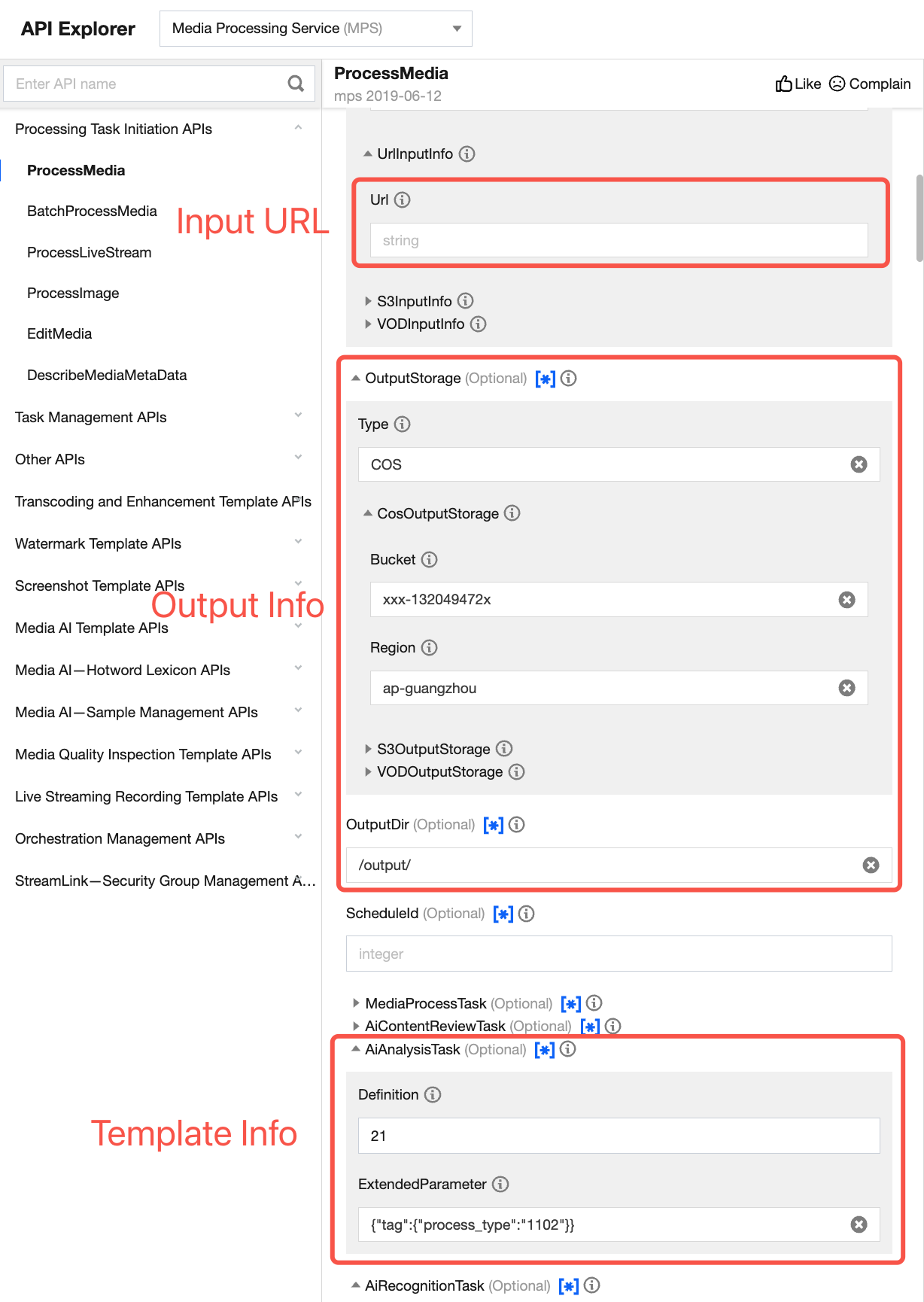
Method 2: Initiating Through APIs
The above introduces how to use API Explorer to call and debug an API online. You can also initiate a POST request to Tencent Cloud directly. The API request domain name is mps.tencentcloudapi.com. Initiate a POST request with definition as the preset music identification template ID (21). The request reference example is as follows:
Note:
Call an API directly, and escape the JSON string when the ExtendedParameter is specified.
{"InputInfo": {"Type": "URL","UrlInputInfo": {"Url": "https://data-125xxxxxxx.cos.ap-guangzhou.tencentcos.cn/test/01-%E3%%%B7.mp4"//Input file URL. Replace it with the available file URL during the actual call.}},"OutputStorage": {"Type": "COS","CosOutputStorage": {"Bucket": "ie-mps-125xxxxxxx","Region": "ap-nanjing"}},"OutputDir": "/common/test/tiger/","AiAnalysisTask": {"Definition": 21,"ExtendedParameter": "{\"tag\":{\"process_type\":\"1102\"}}"},"TaskNotifyConfig": {"NotifyType": "URL","NotifyUrl": "http://xx.xx.xx.xx:5000//callback"}}
Viewing a Callback Result
After the task is initiated successfully, you can obtain the song information from the callback result after music identification.
Tag: song name
SpecialInfo structure
Field Name | Type | Description |
song_name | string | Song name |
album_name | string | Album name |
singer_name | string | Singer name |
other_singer_list | array | List of related singers |
reference_start | int | Approximate starting time point of the song |
reference_end | int | Approximate end time point of the song |
segment_list | array | Song occurrence time period |
Note:
When the TagSet in the callback result is displayed as [], it indicates that there are no matching songs for the audio clip.
reference_start and reference_end are for reference only. The specific time range is determined by segment_list. Since the detection interval is 15 seconds, the error compared to the actual duration of the music is no longer than 15 seconds.
Specific return result example:
"AiAnalysisResultSet": [{"ClassificationTask": null,"CoverTask": null,"DeLogoTask": null,"DescriptionTask": null,"FrameTagTask": null,"HeadTailTask": null,"HighlightTask": null,"HorizontalToVerticalTask": null,"SegmentTask": null,"TagTask": {"BeginProcessTime": "2025-06-13T12:08:20Z","ErrCode": 0,"ErrCodeExt": "","FinishTime": "2025-06-13T12:08:57Z","Input": {"Definition": 283568},"Message": "SUCCESS","Output": {"TagSet": [{"Confidence": 100,"Tag": "An Array of Stars","SpecialInfo": "{\"song_mid\": \"000Quzkn4N0CBN\", \"song_id\": 521340020, \"reference_start\": 30, \"song_name\": \"An Array of Stars\", \"album_name\": \"An Array of Stars\", \"reference_end\": 255, \"singer_name\": \"TIA RAY\", \"segment_list\": [[30, 165], [180, 255]], \"other_singer_list\": [{\"singer_name\": \"Jam Hsiao\"}]}"}]},"Progress": 100,"Status": "SUCCESS"},"Type": "Tag"}]