Overview
- Release Notes and Announcements
- Product Introduction
- Purchase Guide
- Getting Started
- Console Guide
- Overview
- Creating Tasks
- Tasks
- Orchestrations
- Templates
- Resource Packs
- Video Evaluation
- AIGC Content Generation
- Terminal SDK
- Subtitle Editing Tool
- Usage Statistics
- Cloud Access Management Sample
- AIGC and Multimodal Understanding Integration Tutorial
- AI Video Generation
- AI 3D Generation
- AI Voice Generation
- Integration Tutorials
- Audio/Video Transcoding Integration
- Audio/Video Enhancement Integration
- Audio Separation Integration
- Integration of Digital and Visible Watermarks
- Media AI Integration Tutorial
- Smart Subtitle Access Tutorial
- Smart Erase Tutorial (New)
- Smart Erase Tutorial (Old)
- AI Dubbing (excluding erasure) Integration
- One-stop Video Translation Access
- Intelligent Highlights Tutorial
- Video Splitting (Long Videos to Short Videos) Tutorial
- LLM Summarize Tutorial
- Video Remake Access
- Horizontal-to-Vertical Video Transformation Tutorial
- Music Identification Integration
- Media Quality Inspection Integration
- Terminal SDK integration
- MPS Live Stream Recording integration
- DRM integration
- Other tutorials
- Application Scenario and Practical Tutorial
- API Documentation
- History
- Introduction
- API Category
- Making API Requests
- Processing Task Initiation APIs
- Task Management APIs
- Event Notification Parsing APIs
- Transcoding and Enhancement Template APIs
- Watermark Template APIs
- Screenshot Template APIs
- CreateAnimatedGraphicsTemplate
- CreateSnapshotByTimeOffsetTemplate
- CreateSampleSnapshotTemplate
- CreateImageSpriteTemplate
- DeleteAnimatedGraphicsTemplate
- DeleteSnapshotByTimeOffsetTemplate
- DeleteSampleSnapshotTemplate
- DeleteImageSpriteTemplate
- DescribeAnimatedGraphicsTemplates
- DescribeSnapshotByTimeOffsetTemplates
- DescribeSampleSnapshotTemplates
- DescribeImageSpriteTemplates
- ModifyAnimatedGraphicsTemplate
- ModifySnapshotByTimeOffsetTemplate
- ModifySampleSnapshotTemplate
- ModifyImageSpriteTemplate
- Media AI Template APIs
- CreateSmartEraseTemplate
- CreateSmartSubtitleTemplate
- CreateSubtitleEmbedTemplate
- CreateContentReviewTemplate
- CreateAIAnalysisTemplate
- CreateAIRecognitionTemplate
- DeleteSmartEraseTemplate
- DeleteSmartSubtitleTemplate
- DeleteSubtitleEmbedTemplate
- DeleteContentReviewTemplate
- DeleteAIAnalysisTemplate
- DeleteAIRecognitionTemplate
- DescribeSmartEraseTemplates
- DescribeSmartSubtitleTemplates
- DescribeSubtitleEmbedTemplates
- DescribeContentReviewTemplates
- DescribeAIAnalysisTemplates
- DescribeAIRecognitionTemplates
- ModifySmartEraseTemplate
- ModifySmartSubtitleTemplate
- ModifySubtitleEmbedTemplate
- ModifyContentReviewTemplate
- ModifyAIAnalysisTemplate
- ModifyAIRecognitionTemplate
- Media AI—Hotword Lexicon APIs
- Media AI—Sample Management APIs
- Media Quality Inspection Template APIs
- Live Streaming Recording Template APIs
- Orchestration Management APIs
- Data Statistics APIs
- StreamLink—Security Group Management APIs
- AI Generation APIs
- Image Processing Template APIs
- Media AI – Episode Management APIs
- Media AI – Dubbing APIs
- AIGC scenario application APIs
- Other APIs
- Data Types
- Error Codes
- Other Documents
- FAQs
- Related Agreement
- Contact Us
- Glossary
Menu
Overview
Last updated: 2022-08-10 15:36:52Download PDF
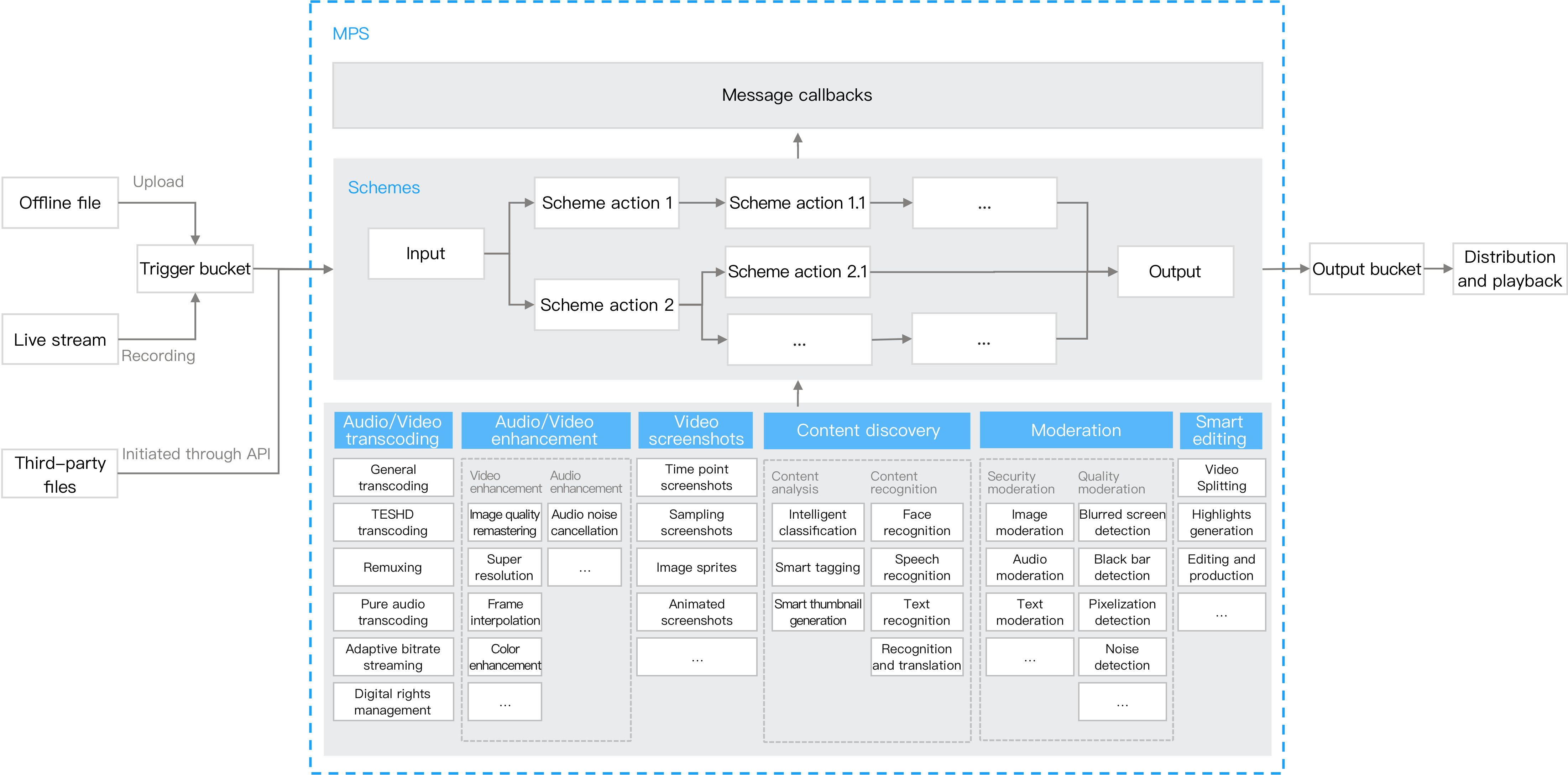
MPS is a cloud-based audio/video processing service. Built on Tencent's many years of experience in audio/video technologies, it provides ultimate encoding capabilities that enable you to play back audio/video files on various platforms at greatly reduced storage and bandwidth costs. It provides a rich set of features including video screencapturing, audio/video enhancement, content discovery, and content moderation, satisfying your video processing needs in a range of different scenarios.
Product Architecture
You can upload source video files to a COS bucket through the console, SDKs, or APIs. You can use the scheme mechanism of MPS to trigger the automatic execution of video processing tasks and send event notifications to CMQ. This helps you stay informed of the status of transcoding tasks. The architecture of MPS is shown below: